













One-click AI tools for teams for consistency & Speed
AI tools built for how teams actually work. Run tasks in one click, customize once if needed, and reuse forever with shared context and guardrails.
Trusted by enterprises


What Are AI Tools In WorkLLM?
Many teams fail because the same work gets redone, rewritten, and rethought every single time by different people, in different ways, with different results. AI Tools exist to kill that repetition. AI Tools are pre-built, task-based actions your team can run in one click to get consistent outcomes for repeatable work.
Each tool:
- Solves a specific job (not “do everything”)
- Uses structured inputs (not free-form chaos)
- Runs with shared context (brand, product, ICP)
- Produces consistent, high-quality output
Think of them as standard operating procedures powered by AI — not prompts you hope work this time.
Why Team Needs AI Tools
Teams repeat the same work every day, but results vary because everyone starts from scratch. AI tools turn repeatable tasks into one-click actions, making work faster, consistent, and easy to share across teams.
How AI Tool Works?
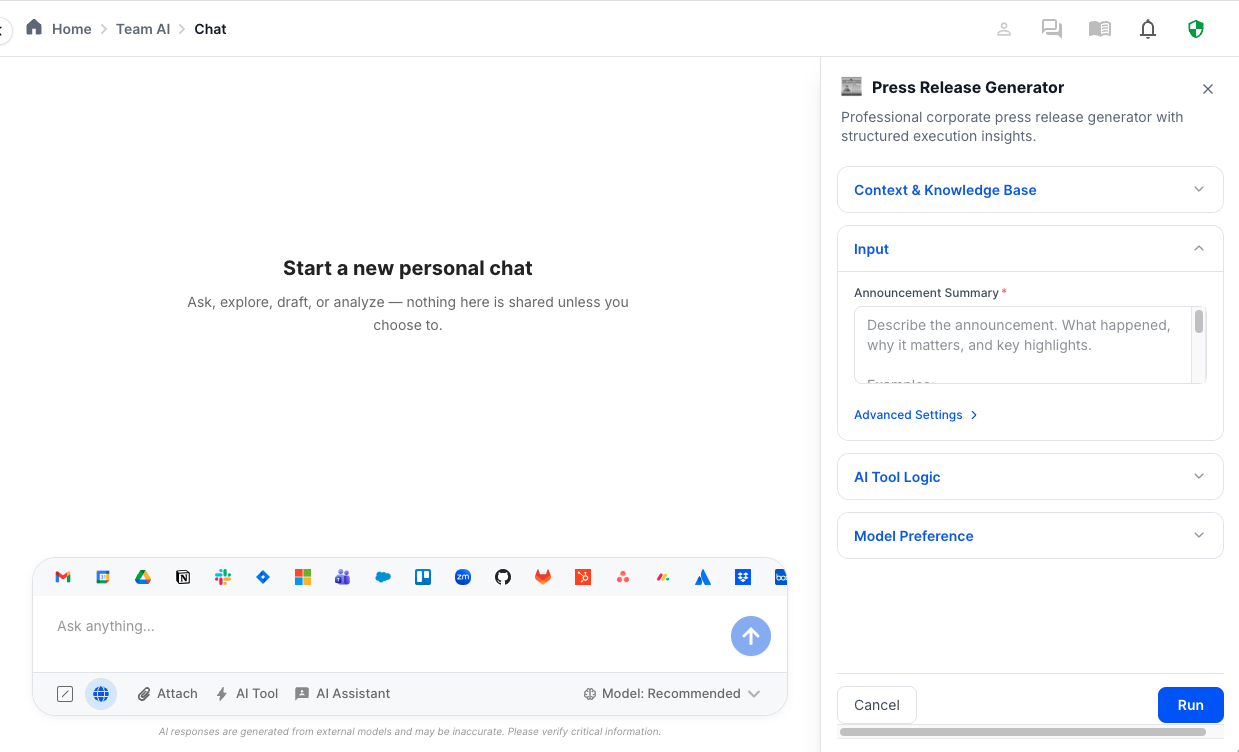
Turn everyday tasks into one-click outcomes. Pick a tool, give a simple input, and get consistent, on-brand results — without writing prompts or managing complexity.

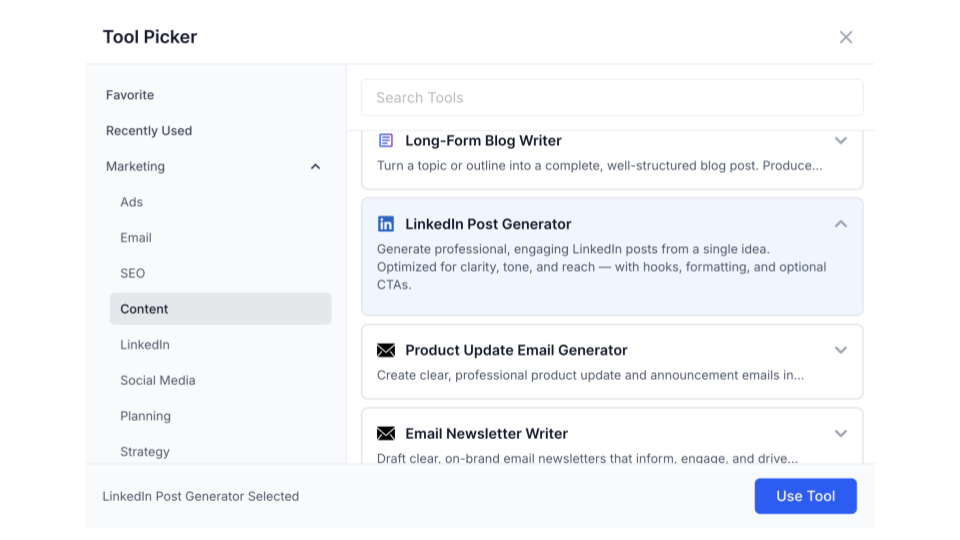
1) Pick an AI Tool
Choose from a growing library of pre-built AI tools, organized by team and use case. Each tool is designed for a specific task — from content and emails to analysis and planning.
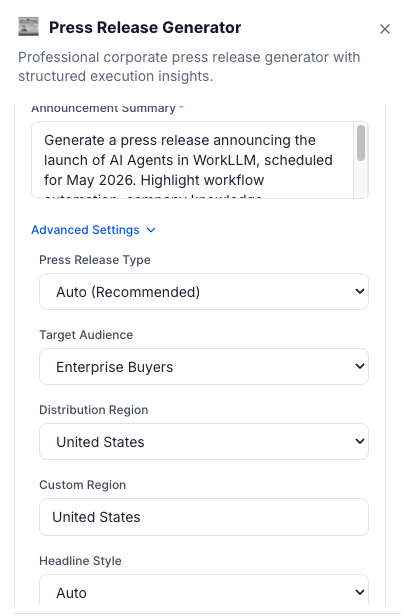
2) Provide an input
Enter a short input or idea. The tool automatically uses shared context, brand guidelines, and predefined instructions to do the heavy lifting for you.
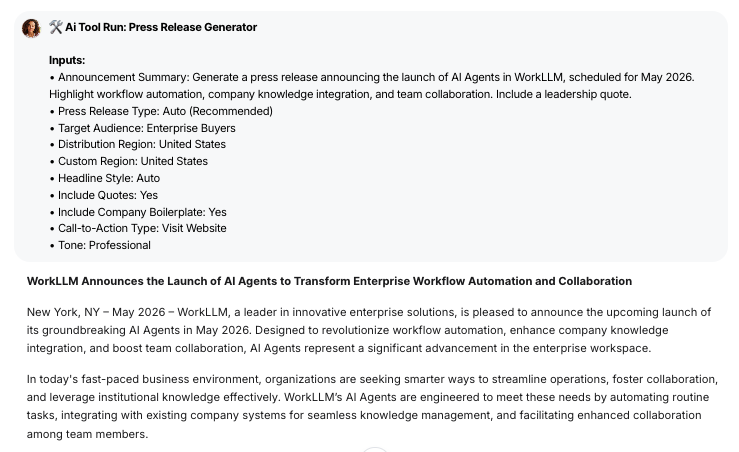
3) Run the tool
Run the tool in one click. The output appears instantly in chat — ready to copy, edit, share, or reuse across your team.
The WorkLLM Advantage
Consistent Outcomes
AI Tools in WorkLLM are designed to produce the same quality output every time, regardless of who runs them. Structured inputs, shared context, and controlled instructions eliminate the variability that comes from free-form prompting so teams stop reinventing the same work.
Context Bound By Design
Every AI Tool runs with predefined, read-only context brand voice, product details, ICP, campaign goals, and internal knowledge. This ensures outputs are grounded in how your company works, not generic AI guesses
One-Click By Default, Flexible When Needed
Tools are optimized for one-click execution. Most require only a single input — often auto-filled from chat, pages, or recent work.
Advanced options are available when needed, but never forced, keeping everyday usage fast and frictionless.
Safe to customize. Impossible to break
Users can copy and customize tools without modifying the original system version. This allows teams to adapt tools for their workflows while preserving a trusted baseline — no accidental prompt drift, no broken setups.
Built for team use, not solo hacks
AI Tools are shared assets, not personal experiments. Visibility controls, ownership, presets, and team defaults ensure tools scale across departments without fragmenting into individual workarounds.
Reduce Rework, Not Just Time
AI Tools don’t just save minutes, they eliminate redundant thinking. Teams stop rewriting the same emails, outlines, summaries, and documents, freeing mental energy for higher-value decisions
FAQs
What is an AI Tools in WorkLLM?
AI Tools are pre-built, task-based actions that produce consistent outputs in one click. They’re designed for repeatable work like writing, planning, summarizing, and drafting — without prompt engineering.
How are AI Tools different from AI Assistants?
AI Tools perform a specific task on demand. AI Assistants answer questions and explain information within a domain. Tools do the work; assistants provide knowledge and guidance.
How are AI Tools different from AI Agents?
AI Tools are manually triggered and produce immediate output. AI Agents run automatically based on triggers and conditions. Tools execute; agents ensure execution happens over time.
Do I need to write prompts to use AI Tools?
No. Tools come with pre-defined instructions and structure. Most require only one input — and many auto-fill it from chat, pages, or previous usage.
Can I customize an AI Tool?
Yes. You can copy any system tool and customize inputs, instructions, and output format — without affecting the original version.
What happens to the original tool when I customize it?
The original system tool remains unchanged. Your customized version becomes a separate tool with its own ownership and visibility.
Can AI Tools use our brand voice and company context?
Yes. AI Tools run with shared, read-only context such as brand voice, product information, ICP, and internal knowledge.
Can tools access documents or internal knowledge?
Yes. Documents or links can be added to any AI Tools to use as a context.
Can AI Tools be shared with my team?
Yes. Tools can be private, team-shared, or workspace-wide, depending on visibility settings.
Can different teams have different versions of the same tool?
Yes. Teams can create their own customized copies while preserving a common baseline tool across the organization.
Happy Customers
Customer satisfaction is our major goal. See what our customers are saying about us.
“Vivamus sagittis lacus vel augue laoreet rutrum faucibus dolor auctor. Vestibulum id ligula porta felis euismod semper. Cras justo odio dapibus facilisis sociis natoque penatibus.”

![]()
Coriss Ambady
Financial Analyst ABC.com
“Vivamus sagittis lacus vel augue laoreet rutrum faucibus dolor auctor. Vestibulum id ligula porta felis euismod semper. Cras justo odio dapibus facilisis sociis natoque penatibus.”

![]()
Cory Zamora
Marketing Specialist ABC.com
“Vivamus sagittis lacus vel augue laoreet rutrum faucibus dolor auctor. Vestibulum id ligula porta felis euismod semper. Cras justo odio dapibus facilisis sociis natoque penatibus.”

![]()
Nikolas Brooten
Sales Specialist Financial Analyst ABC.com
“Vivamus sagittis lacus vel augue laoreet rutrum faucibus dolor auctor. Vestibulum id ligula porta felis euismod semper. Cras justo odio dapibus facilisis sociis natoque penatibus.”

![]()
Coriss Ambady
Financial Analyst Financial Analyst ABC.com
“Vivamus sagittis lacus vel augue laoreet rutrum faucibus dolor auctor. Vestibulum id ligula porta felis euismod semper. Cras justo odio dapibus facilisis sociis natoque penatibus.”

![]()
Jackie Sanders
Investment Planner Financial Analyst ABC.com
“Vivamus sagittis lacus vel augue laoreet rutrum faucibus dolor auctor. Vestibulum id ligula porta felis euismod semper. Cras justo odio dapibus facilisis sociis natoque penatibus.”

![]()
Laura Widerski
Sales Specialist Financial Analyst ABC.com