
AI Tool: Email Outreach Generator

Write personalized, compliant cold emails and follow-up sequences that reflect your positioning—not spam.

Pricing

Included in paid plans.

Provided By

WorkLLM

Category

Email Marketing, Content, Sales

Tool Owner

Sales / Outbound Lead or SDR Manager

Owner Role

The Tool Owner uploads and maintains the brand voice, ICPs, value propositions, objection-handling, social proof, and compliance rules so every outreach email is personalized, on-message, and claim-safe. They are responsible for keeping examples of high-performing emails and sales narratives up to date so the tool can mirror what already works.

AI Tool Logic

Managed by WorkLLM

LLM Compatibility

Model Agnostic. Works with any Text based Models.

Description

The Email Outreach Generator acts like a senior outbound strategist and persuasive email copywriter. It creates cold emails, warm intros, partnership pitches, and follow-up sequences that are:

  • Anchored in your outreach goal
  • Tuned to the prospect’s role, industry, and context
  • Consistent with your brand positioning and value props
  • Respectful of compliance, claims, and tone

It enforces a clear email structure, avoids spammy language and fake claims, and generates copy that feels personalized and conversion-oriented—without ever exposing internal instructions or document references in the email itself.

Context & Knowledge Base

To enforce your positioning + personalization philosophy, the Tool Owner should upload:

Strongly recommended

  • Brand Voice & Tone Guide – Ensures emails sound like your brand, not generic templates.
  • Product / Offer Fact Sheet – Provides accurate details to avoid invented features or promises.
  • ICP / Target Persona Document – Guides role-, industry-, and segment-specific language.
  • Value Proposition Framework – Keeps messaging consistent across all outreach.
  • Objection Handling Guide – Supplies ready-to-use, on-brand responses and angles.
  • Past High-Performing Email Examples – Shows what “good” looks like in your context.
  • Compliance / Claims Restrictions – Defines what can and cannot be claimed.

Optional but powerful

  • Competitor Comparison Notes – Adds context for “why us vs. them” angles.
  • Case Studies / Social Proof Bank – Supplies grounded proof and outcomes.
  • Pricing Summary – Keeps any pricing references consistent and accurate.
  • Sales Narrative / Messaging Hierarchy – Aligns emails to your broader sales story.

The tool automatically extracts:

  • Core value props & positioning language
  • Approved product and offer names
  • Target audience framing and pain points
  • Objection handling phrases
  • Social proof examples and safe fallback patterns
  • Restricted or disallowed claims

It never invents metrics, logos, revenue/performance claims, or specific customer stories that aren’t in your inputs or documents.

Input

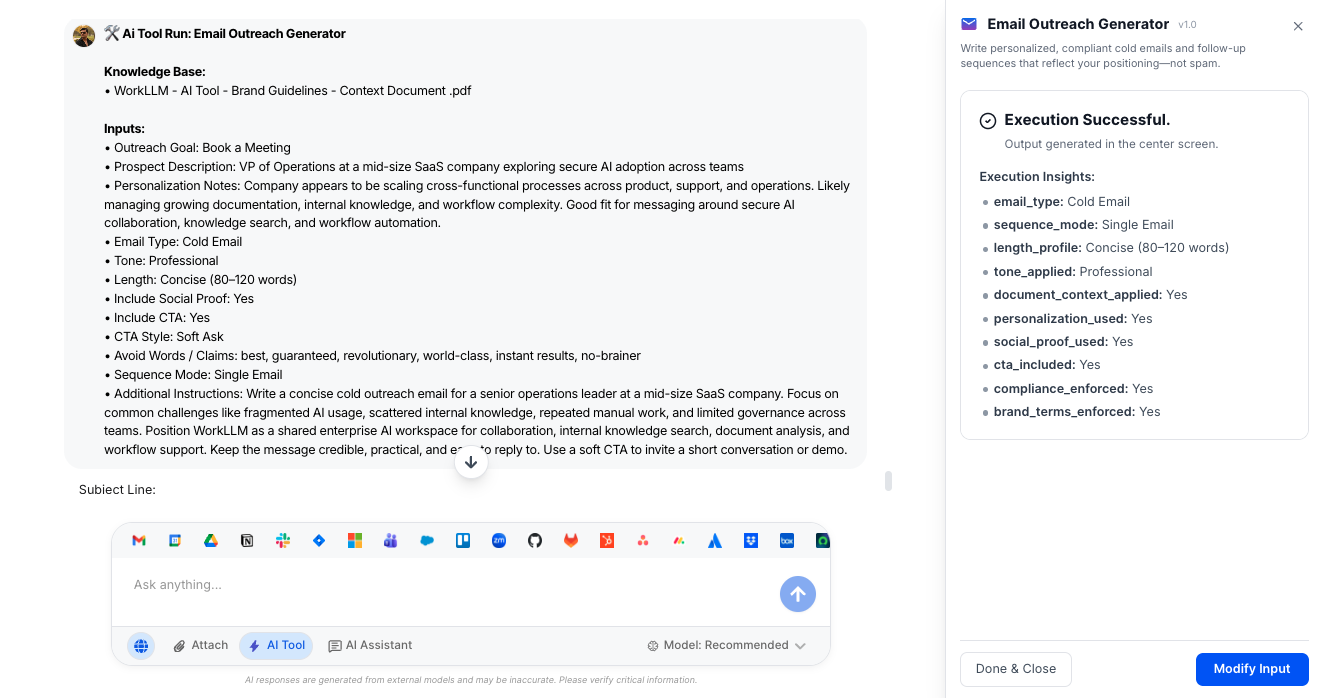
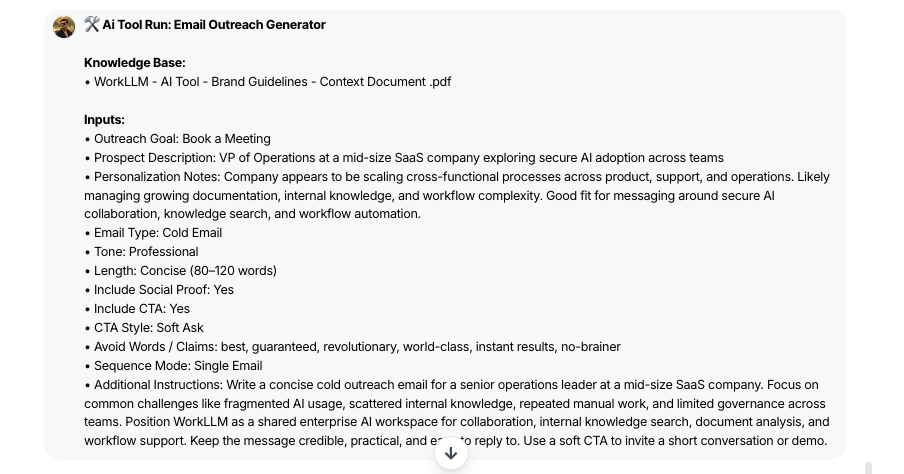
Give the Email Outreach Generator your goal, who you’re emailing, and a few simple guardrails.

  • Outreach Goal – Set the primary objective, like booking a meeting, starting a conversation, or promoting a resource.
  • Prospect Description – Summarize who you’re emailing (role, company, industry, or persona) so the message fits their world.
  • Personalization Notes (Optional) – Add any trigger events or context (e.g., funding, post, project) to weave into the opener.
  • Email Type (Optional) – Choose the format such as cold email, warm intro, follow‑up, re‑engagement, or partnership pitch.
  • Tone (Optional) – Pick how the email should sound (professional, conversational, bold, consultative, executive-level, etc.).
  • Length (Optional) – Select the desired length, from very short to more detailed, to match your outreach style.
  • Include Social Proof (Optional) – Decide whether to include credibility statements when supporting proof is available.
  • Include CTA & Style (Optional) – Control if a call-to-action is included and whether it’s soft, direct, calendar-focused, or question-based.
  • Sequence Mode (Optional) – Choose between a single email or a 2–3 step follow-up sequence for multi-touch outreach.
  • Avoid Words / Claims (Optional) – Specify any phrases, promises, or topics the AI must avoid for brand or compliance reasons.

Output

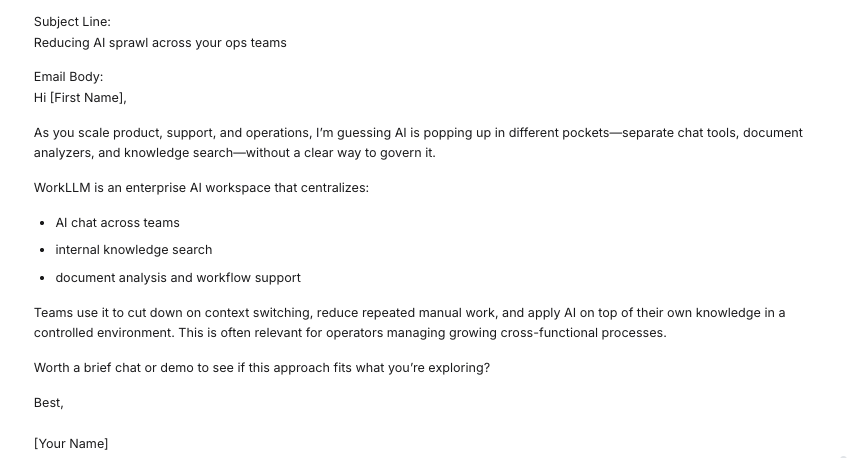
Receive ready-to-send outreach emails or sequences that feel personal, on-brand, and goal‑aligned.

  • Conversion-Focused Subject Lines – Short, relevant subjects that speak to the prospect’s context instead of generic clickbait.
  • Personalized Openings – First lines that reflect the prospect description and personalization notes to avoid “template” feel.
  • Prospect-Centric Value Story – Body copy that frames your solution around their pains, priorities, and outcomes—not just features.
  • Social Proof (If Enabled) – Credibility statements drawn from your inputs/docs, without invented names, logos, or metrics.
  • Clear, Aligned CTAs – Calls-to-action that match your chosen goal and CTA style, making the next step obvious and low-friction.
  • Multi-Step Sequences (If Selected) – Coordinated follow-up emails that add new angles or value instead of repeating the first message.
  • Tone & Length Control – Emails written to your selected tone and length profile, from punchy one-liners to fuller narratives.
  • Brand & Compliance Safe – Language that respects your avoid-list and internal rules, steering clear of spammy or risky claims.

Execution Insights

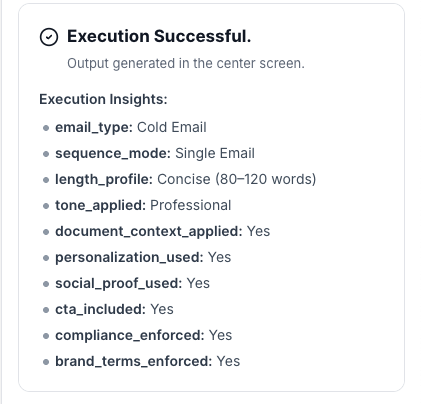
Behind the scenes, each run also includes a structured metadata block (not shown to prospects) so teams can audit and govern usage:

  • email_type – Cold Email, Warm Intro, Follow-up 1, etc.
  • sequence_mode – Single, 2-Step, or 3-Step.
  • length_profile – Very Short, Concise, Standard, or Detailed.
  • tone_applied – The tone actually used (e.g., Professional, Executive-level).
  • document_context_applied – Yes/No (whether uploaded docs were incorporated).
  • personalization_used – Yes/No (whether personalization notes were used).
  • social_proof_used – Yes/No (and if fallback framing was needed).
  • cta_included – Yes/No (based on the Include CTA toggle).
  • compliance_enforced – Yes/No (restricted claims logic applied).
  • brand_terms_enforced – Yes/No (brand wording and avoid-list respected).

This metadata helps sales and ops teams understand how each email was generated and refine defaults over time.

Who is this for?

  • SDR and BDR teams running outbound at scale
  • Account Executives doing targeted outreach
  • Partnerships and BD teams sending collaboration pitches
  • Founders and leaders in early-stage companies handling their own outreach
  • RevOps / Sales Ops teams standardizing outbound workflows

Anyone who needs repeatable, on-brand, non-spammy email outreach that still feels personal.

Data & Permissions

The Email Outreach Generator uses:

  • Default tool context from the Tool Owner (voice, ICP, value props, objection handling, social proof, compliance, etc.)
  • Optional per-run attachments (account lists, campaign briefs, notes)
  • User inputs (goal, prospect description, tone, length, sequence mode, etc.)

It does not:

  • Scrape external data automatically
  • Invent metrics, logos, revenue, or performance claims
  • Fabricate specific events (funding, news, achievements)

All claims and proof must come from your documents or inputs.

Security

  • All uploaded documents and inputs remain within your organization’s secure WorkLLM workspace.
  • No data is shared externally or used to train third-party models.
  • Enterprise-grade encryption and role-based access controls apply to all content and runs.

Governance

WorkLLM provides structure, control, and consistency across every execution.

  • Tool Logic: Managed by WorkLLM
  • Default Context: Managed by Marketing Manager / SEO Lead
  • Visibility: Organization-wide
  • User Customization: Input-level only

This ensures standardized outputs across teams while still allowing flexibility at execution time.

Similar AI Tools

Brand Guidelines Creator

By: WorkLLM

Create comprehensive, actionable brand voice guidelines that ensure consistency across all marketing, sales, support, and AI-assisted content.

Press Release Writer

By: WorkLLM

Generate professional, publication-ready press releases that align with your brand voice, follow journalistic standards, and maintain credibility across all distribution channels.

Abandoned Cart Email Sequence Writer

By: WorkLLM

Generate high-converting, brand-aligned abandoned cart email sequences that recover revenue while maintaining customer trust and compliance.

Marketing Budget Planner

By: WorkLLM

Create a data-driven marketing budget allocation plan that optimizes performance, aligns with your objectives, and respects financial constraints.

Client Proposal Generator

By: WorkLLM

Create structured, persuasive, and commercially realistic client proposals in minutes—aligned with your real pricing, services, and legal terms, not AI guesswork.

Tone Controlled Response Tool

By: WorkLLM

Rewrite any message into the exact tone you need—on‑brand, de‑risked, and ready to send for support, internal comms, or executive use.

Happy Customers

Customer satisfaction is our major goal. See what our customers are saying about us.





