


AI Tool: User Story Writer
Pricing
Provided By
Category
Tool Owner
Owner Role
AI Tool Logic
LLM Compatibility


Description
User Story Writer behaves like a senior product manager and agile practitioner. It converts high‑level feature or initiative context into well‑formed, INVEST‑quality user stories with clear outcomes, optional acceptance criteria, edge cases, non‑functional requirements, and definition of done. Stories are grounded in your product strategy, personas, roadmap, and engineering standards, avoiding vague language, solution bias (when enabled), and hallucinated technical details.
Context & Knowledge Base
To ensure every story aligns with product governance and is ready for engineering, the Tool Owner should upload:
Strongly recommended documents
- Product Strategy Document – Anchors all stories in current strategic priorities and value drivers.
- User Persona Document – Provides official persona names, roles, pains, and contexts so stories use the right “As a…” framing.
- Roadmap / OKR Document – Connects stories to roadmap items and measurable objectives.
- Existing PRD Template – Helps the tool mirror how features are typically broken down in your organization.
- Engineering Standards / Definition of Done – Ensures output aligns with how “done” and quality are defined by engineering.
- Naming Conventions Guide – Enforces consistent product and domain terminology across stories.
Optional but powerful
- Prior User Stories – Shows what “good” looks like in your environment, improving tone and structure.
- Acceptance Criteria Examples – Teaches the tool your preferred Given/When/Then or bullet style and level of detail.
- Edge Case Playbook – Helps the AI anticipate realistic edge cases your teams care about.
- UX Research Notes – Grounds stories in real user behavior, needs, and constraints.
- API Contracts / Technical Constraints – Prevents invented APIs and helps acceptance criteria reflect real limits.
These inputs ensure alignment with strategy, no generic stories, and consistently engineering‑ready quality.
Input
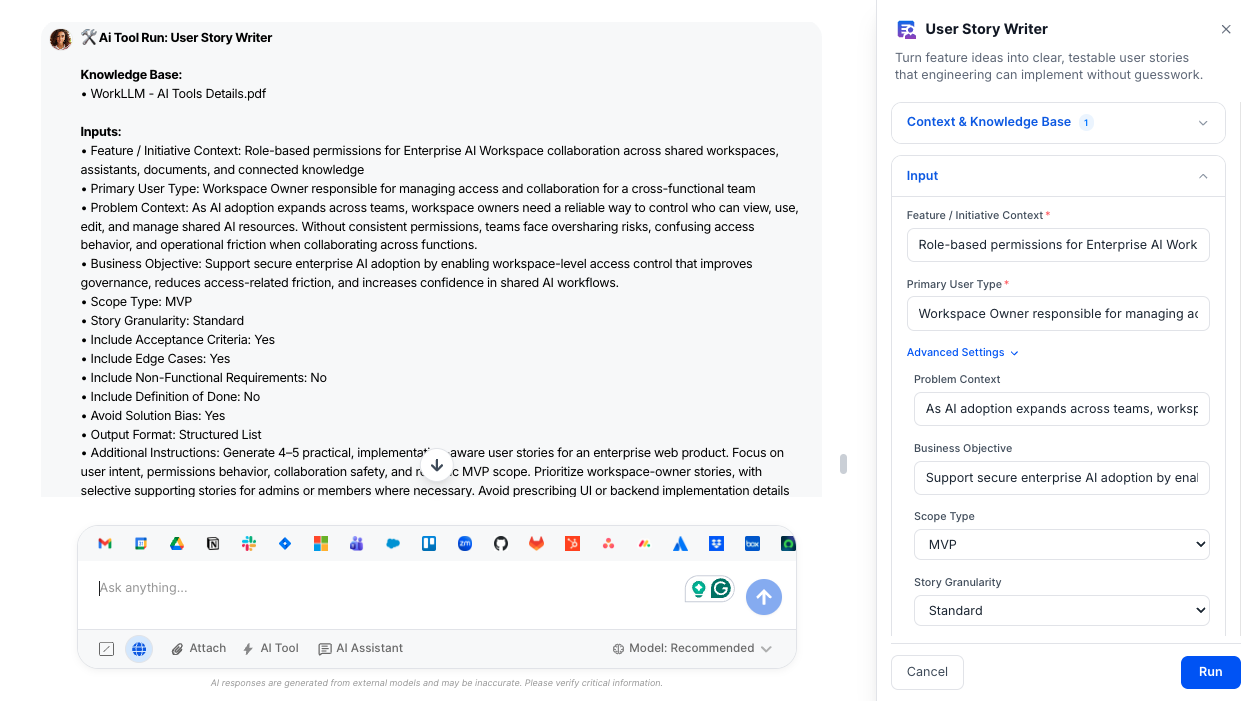
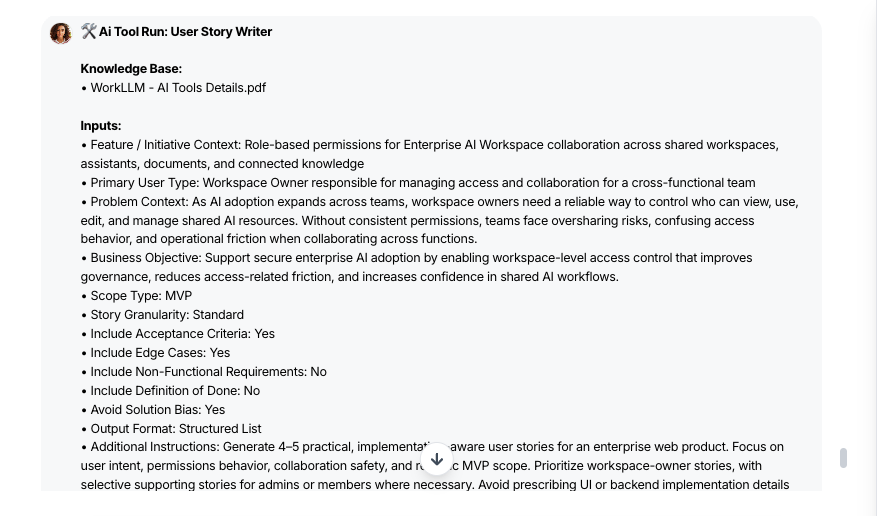
Give User Story Writer a bit of product context and it turns it into clear, implementation‑ready user stories.
- Feature / Initiative Context (Required) – Short description of the feature, flow, or initiative you want stories for.
- Primary User Type (Required) – Main persona or role (e.g., admin, agent, analyst) to anchor the “As a…” clause.
- Problem Context (Optional) – What user or business problem this work is meant to solve.
- Business Objective (Optional) – The outcome you’re targeting (e.g., activation, efficiency, data quality).
- Scope Type (Optional) – Label work as MVP, Enhancement, New Feature, Technical Improvement, Experiment, or Internal Tool so depth matches impact.
- Story Granularity (Optional) – Choose High‑Level, Standard, or Detailed depending on how many and how deep you want stories.
- Include Acceptance Criteria (Optional) – Automatically add testable acceptance criteria per story.
- Include Edge Cases (Optional) – Call out realistic error, permission, and boundary scenarios.
- Include Non‑Functional Requirements (Optional) – Add performance, security, accessibility, or scalability notes.
- Include Definition of Done (Optional) – Generate a concise DoD checklist aligned to your teams’ standards.
- Avoid Solution Bias (Optional) – Keep stories outcome‑focused instead of prescribing UI or implementation details.
- Output Format (Optional) – Choose Structured List, Jira‑ready, or Table format for easy handoff.
Output
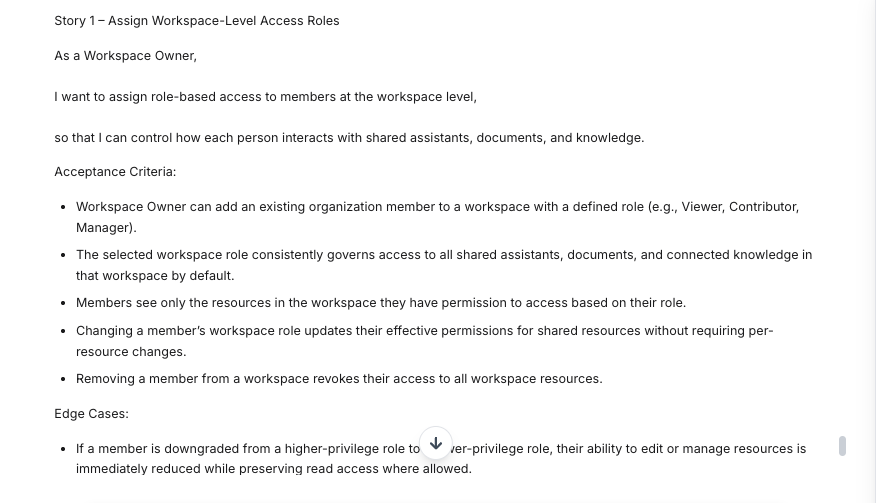
User Story Writer returns clean, testable user stories your teams can drop straight into their backlog.
- Well‑formed User Stories – INVEST‑quality stories using “As a / I want / So that” with specific actions and outcomes.
- Right‑Sized Story Breakdown – Epics, standard sets, or detailed splits depending on your chosen granularity and scope.
- Acceptance Criteria (If Enabled) – Concrete, verifiable criteria in Given/When/Then or bullet form for each story.
- Edge Cases (If Enabled) – Documented empty, error, permission, and boundary scenarios that often get missed.
- Non‑Functional Requirements (If Enabled) – High‑level performance, security, accessibility, or scalability expectations.
- Definition of Done (If Enabled) – A simple checklist to align product, engineering, and QA on what “done” means.
- Scope‑Aware Story Set – Stories tailored for MVPs, enhancements, new features, experiments, or internal tools.
- Handoff‑Ready Format – Output structured for quick copy‑paste into Jira or your preferred backlog tool.
Execution Insights
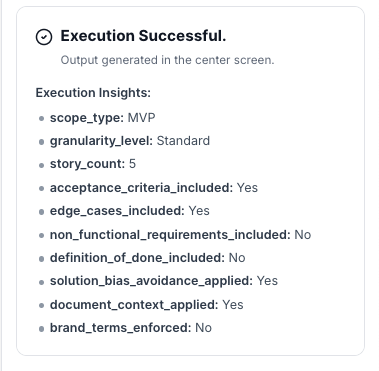
Every run also generates a structured execution metadata block (for product ops and tooling; not shown in the user stories themselves):
- scope_type – Selected scope (MVP, Enhancement, New Feature, Technical Improvement, Experiment, Internal Tool).
- granularity_level – High‑Level / Standard / Detailed.
- story_count – Number of user stories generated.
- acceptance_criteria_included – Yes / No.
- edge_cases_included – Yes / No.
- non_functional_requirements_included – Yes / No.
- definition_of_done_included – Yes / No.
- solution_bias_avoidance_applied – Yes / No (whether Avoid Solution Bias was ON and enforced).
- document_context_applied – Yes / No (whether uploaded docs influenced generation).
- brand_terms_enforced – Yes / No (whether official naming/terminology was followed).
This makes output auditable and helps product and engineering leaders see how closely stories follow governance.
Who is this for?
- Product managers and product owners writing or refining user stories
- Engineering managers and tech leads looking for clearer, testable work items
- Scrum masters and agile coaches standardizing story quality
- Product Ops teams scaling best practices across squads
Data & Permissions
User Story Writer only uses what you give it and what’s in your WorkLLM workspace:
- Uploaded org documents – Templates, strategy, OKRs, personas, constraints, architecture, compliance, and security.
- Per‑run attachments (optional) – Feature briefs, discovery notes, or diagrams specific to a given PRD.
- User inputs – The fields you fill for each run (problem, scope, constraints, etc.).
It does not automatically pull from external tools unless you explicitly provide that content.
Security
- All uploaded documents and inputs remain within your organization’s secure WorkLLM workspace.
- No data is shared externally or used to train third-party models.
- Enterprise-grade encryption and role-based access controls apply to all content and runs.
Governance
WorkLLM provides structure, control, and consistency across every execution.
- Tool Logic: Managed by WorkLLM
- Default Context: Managed by Head of Product, Group PM, or Senior PM (often supported by Product Ops).
- Visibility: Organization-wide
- User Customization: Input-level only
This ensures standardized outputs across teams while still allowing flexibility at execution time.
Similar AI Tools
Happy Customers
Customer satisfaction is our major goal. See what our customers are saying about us.
“Vivamus sagittis lacus vel augue laoreet rutrum faucibus dolor auctor. Vestibulum id ligula porta felis euismod semper. Cras justo odio dapibus facilisis sociis natoque penatibus.”

![]()
Coriss Ambady
Financial Analyst ABC.com
“Vivamus sagittis lacus vel augue laoreet rutrum faucibus dolor auctor. Vestibulum id ligula porta felis euismod semper. Cras justo odio dapibus facilisis sociis natoque penatibus.”

![]()
Cory Zamora
Marketing Specialist ABC.com
“Vivamus sagittis lacus vel augue laoreet rutrum faucibus dolor auctor. Vestibulum id ligula porta felis euismod semper. Cras justo odio dapibus facilisis sociis natoque penatibus.”

![]()
Nikolas Brooten
Sales Specialist Financial Analyst ABC.com
“Vivamus sagittis lacus vel augue laoreet rutrum faucibus dolor auctor. Vestibulum id ligula porta felis euismod semper. Cras justo odio dapibus facilisis sociis natoque penatibus.”

![]()
Coriss Ambady
Financial Analyst Financial Analyst ABC.com
“Vivamus sagittis lacus vel augue laoreet rutrum faucibus dolor auctor. Vestibulum id ligula porta felis euismod semper. Cras justo odio dapibus facilisis sociis natoque penatibus.”

![]()
Jackie Sanders
Investment Planner Financial Analyst ABC.com
“Vivamus sagittis lacus vel augue laoreet rutrum faucibus dolor auctor. Vestibulum id ligula porta felis euismod semper. Cras justo odio dapibus facilisis sociis natoque penatibus.”

![]()
Laura Widerski
Sales Specialist Financial Analyst ABC.com
See how WorkLLM fits your team
Explore how a shared AI workspace keeps context, collaboration, and execution connected.