Notion

By: WorkLLMAccess, search, and update your Notion workspace through chat — find knowledge, summarize documents, and manage pages without switching tools.

Access Controls

Security

Permissions

Overview

WorkLLM connects securely to your Notion workspace so teams can search knowledge, summarize documents, and update pages directly from chat.

Instead of manually navigating databases, pages, and nested workspaces, users can ask WorkLLM to retrieve or update information using natural language.

WorkLLM respects Notion’s permission model and only accesses pages or databases that the connected user is allowed to see. All actions remain transparent, permission-aware, and traceable so teams can safely use AI to interact with their internal knowledge.

Features

Natural language knowledge search

Find relevant pages, documents, and database entries across your Notion workspace using simple chat prompts.

Instant Document Summaries

Quickly summarize long pages, meeting notes, or documentation stored in Notion.

Smart Database Queries

Ask questions about Notion databases and retrieve filtered tasks, records, or project updates.

Create Pages from Chat

Create new Notion pages directly from WorkLLM without opening your Notion workspace.

Update Pages via Chat

Add notes, summaries, or updates to existing Notion pages through natural language commands.

Conversational Workspace Assistant

Use WorkLLM as a conversational interface to navigate and interact with your Notion knowledge base.

Use Cases with examples

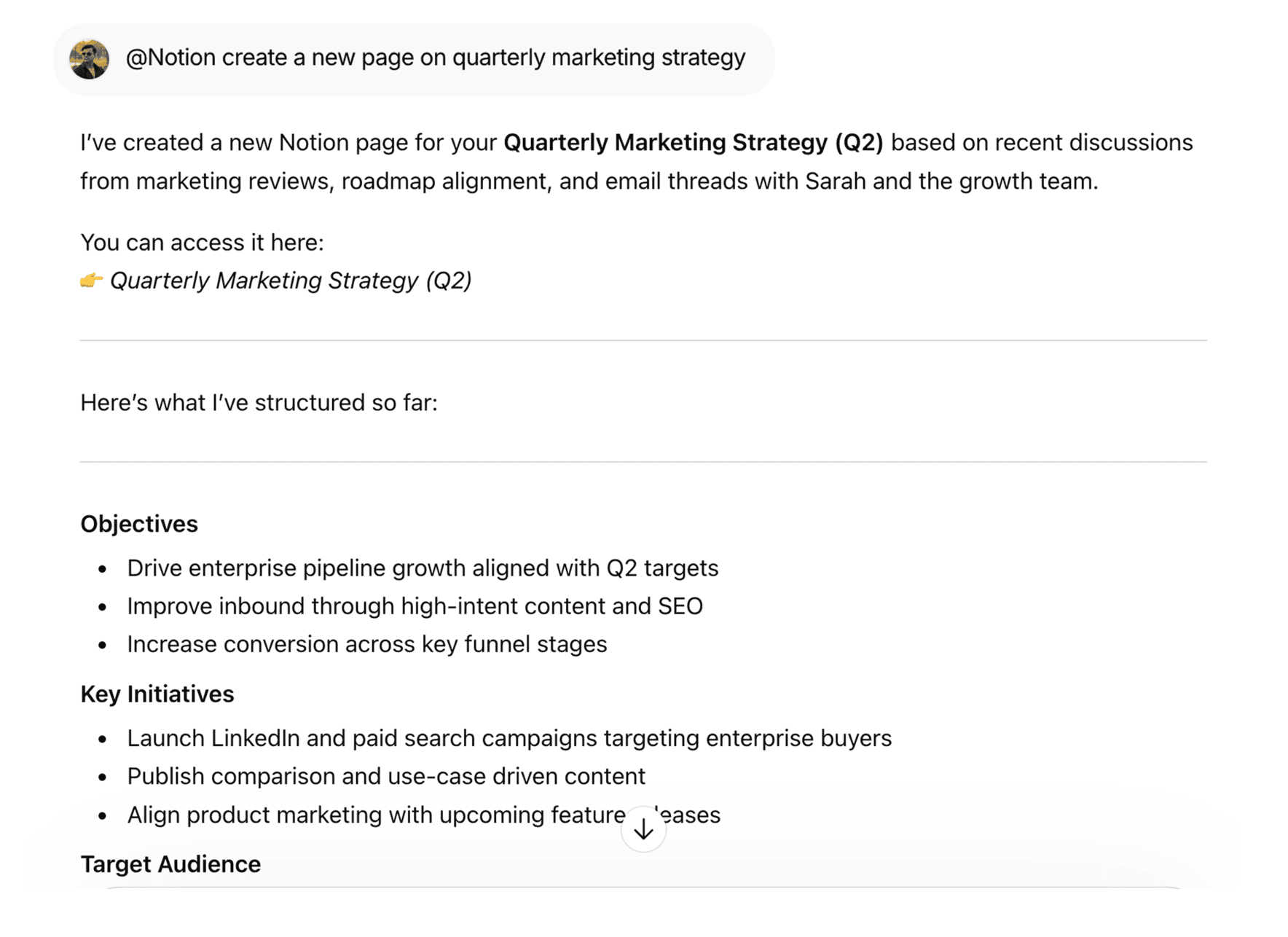
Notion - Create new pages | WorkLLM

Create New Pages Instantly

Use simple commands like @Notion create a new page on quarterly marketing strategy to generate fully structured documents in seconds.

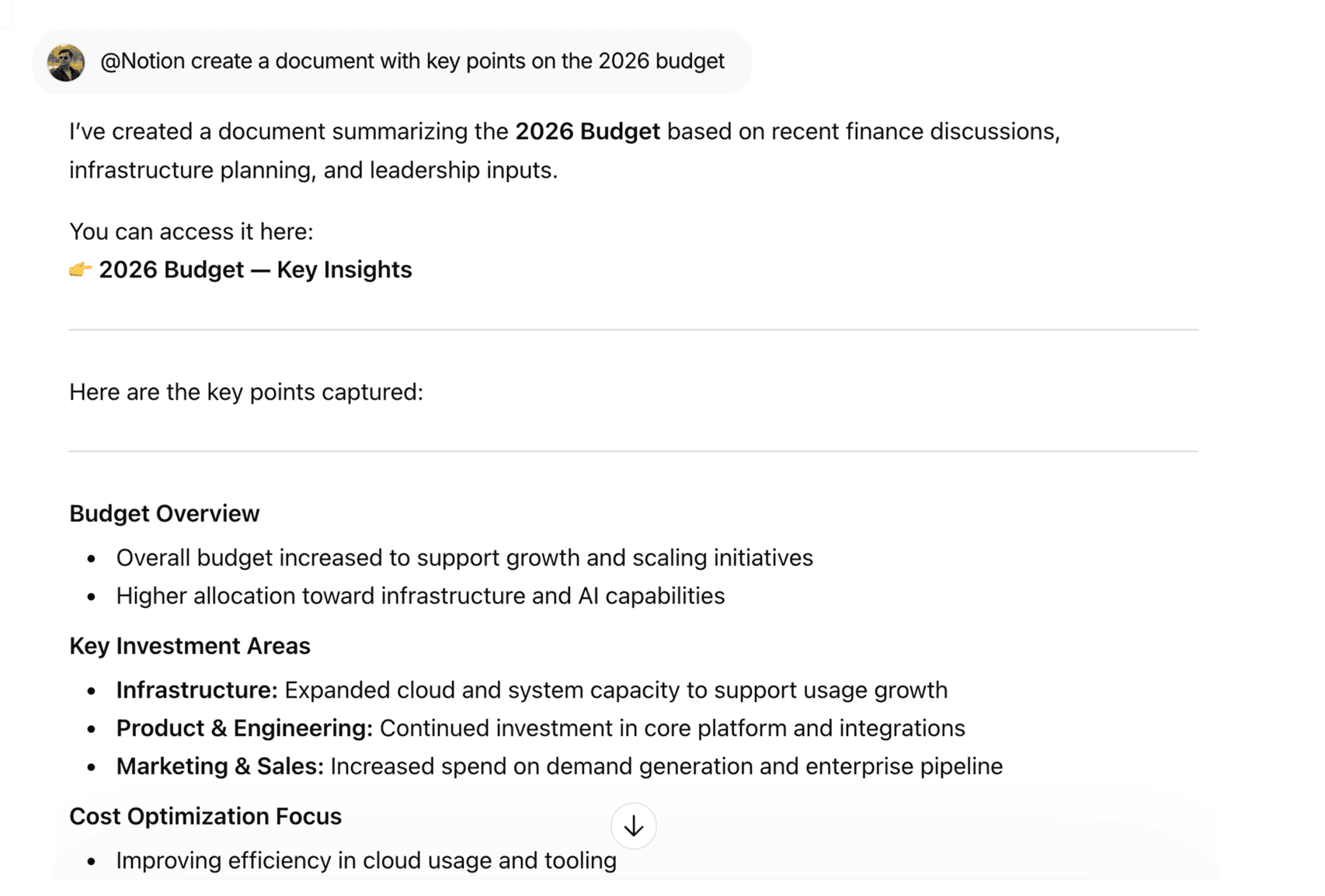
Notion - Build research backed documents | WorkLLM

Build Research-Backed Documents

Generate detailed documents with live insights using @Notion create a document with key points on the 2026 budget

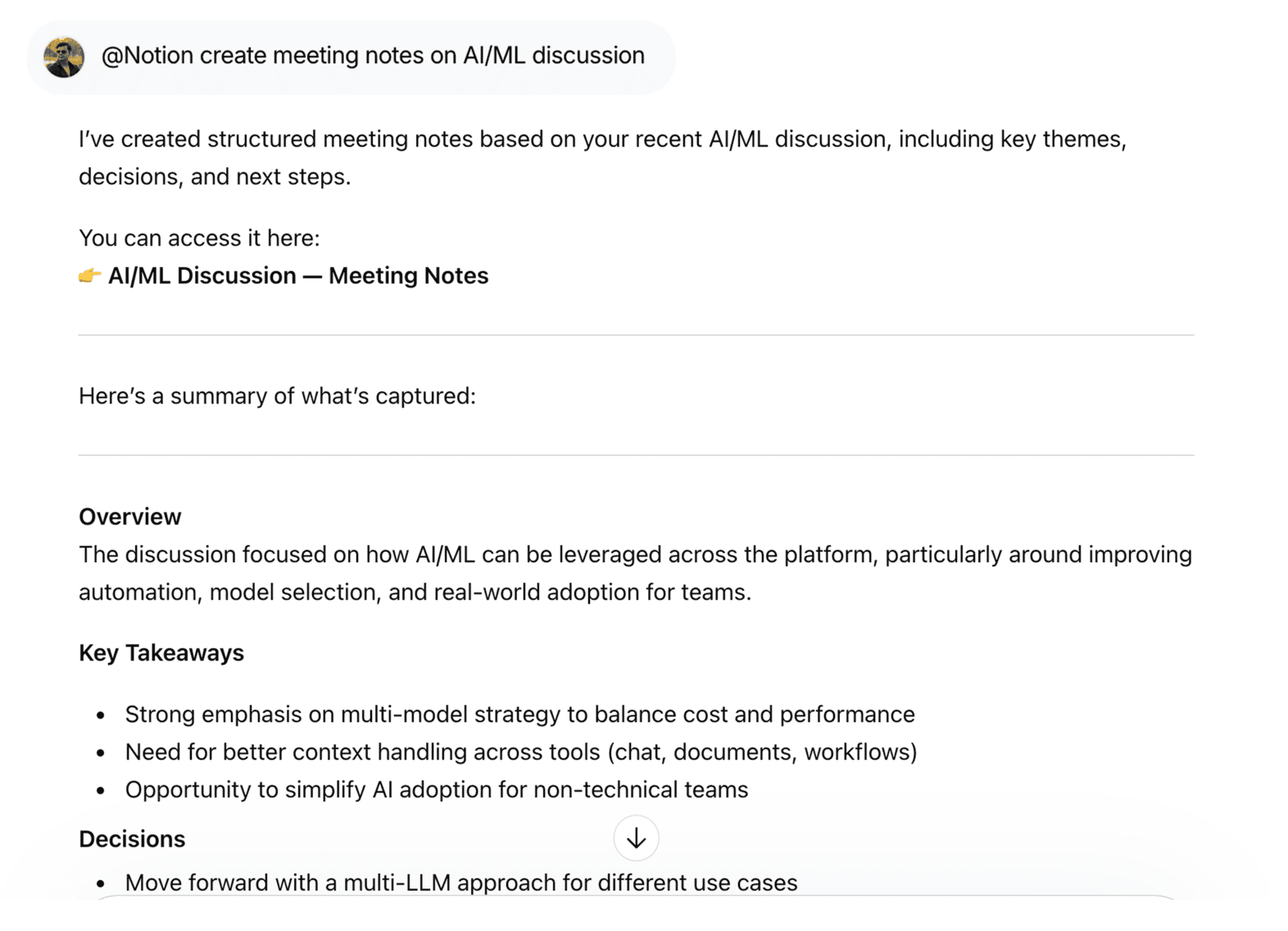
Notion - Capture Meeting Notes | WorkLLM

Capture Meeting Notes Effortlessly

Turn quick inputs into organized notes with @Notion create meeting notes on AI/ML discussion, including summaries and key takeaways.

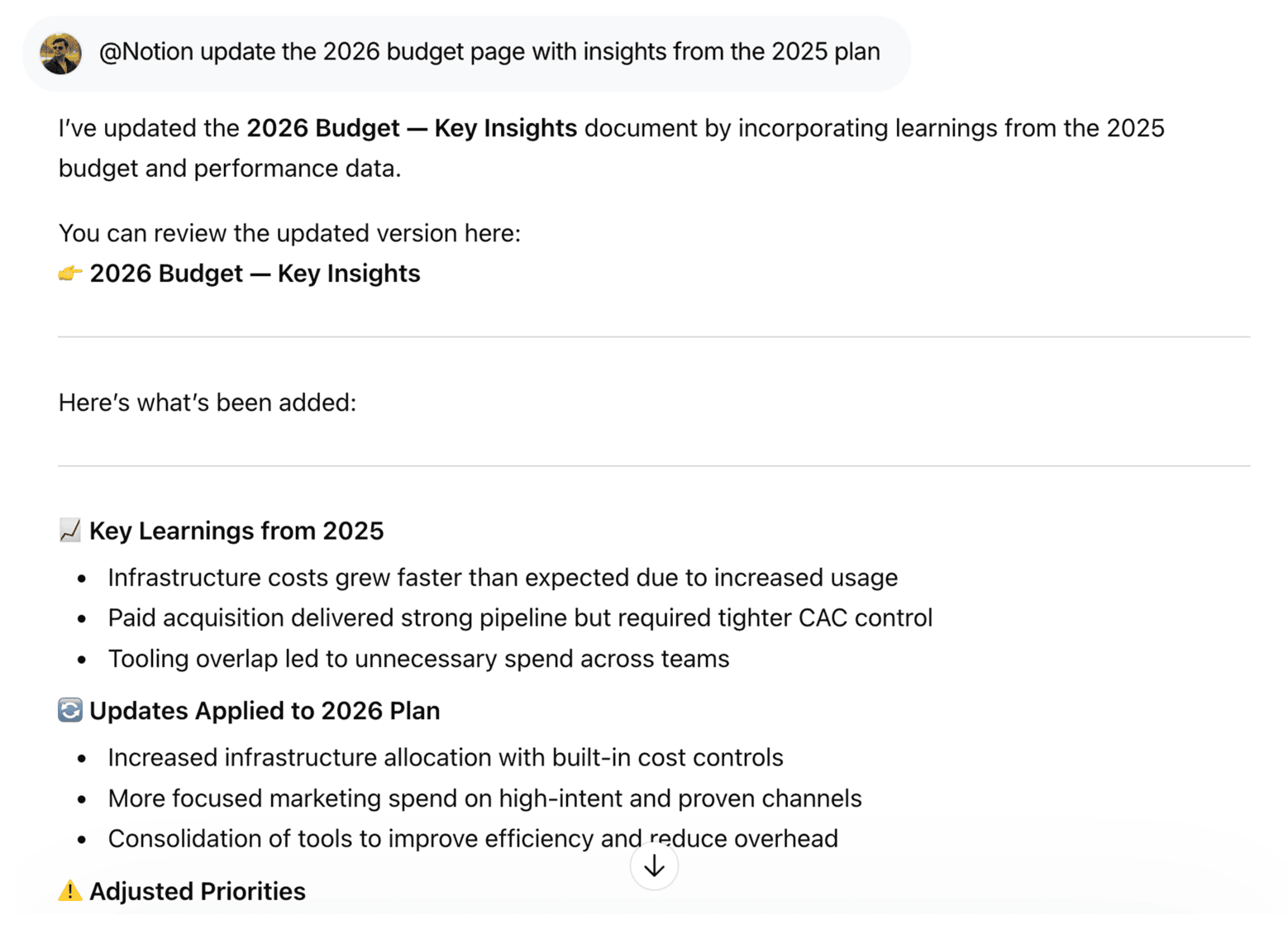
Notion - Update existing pages | WorkLLM

Update Existing Pages with Context

Keep documents up to date by referencing past work using @Notion update the 2026 budget page with insights from the 2025 plan.

FAQs

WorkLLM can search pages, summarize documents, query databases, create pages, and update content — all through simple natural language prompts. It turns your Notion workspace into a conversational knowledge system.

Yes. WorkLLM works with standard Notion pages as well as structured databases. You can retrieve information, generate summaries, or analyze database records directly through chat.

No. WorkLLM only performs actions when you explicitly request them. It will not automatically edit pages, change database records, or restructure your workspace.

WorkLLM uses your connected Notion account. It can only access pages and databases that your account already has permission to view or edit. If you cannot see something in Notion, WorkLLM cannot access it either.

WorkLLM may temporarily process Notion content to generate responses (such as summaries or insights). However, your data remains scoped to your workspace and is not used to train models or shared with other customers.

No. Results are shown only in the chat where the request is made (private chat or shared workspace). Notion permissions still apply — users cannot see content they don’t have access to in Notion.

No. Project-level administration (creating/deleting projects, changing schemes, etc.) remains in Jira’s admin UI. WorkLLM focuses on day‑to‑day work management inside projects—issues, sprints, epics, and reporting.

WorkLLM may temporarily process and cache Jira data to fulfill your requests (e.g., when generating summaries or status reports), but data use is scoped to your workspace and not repurposed for other customers. Long‑term retention and logs follow your workspace and compliance settings.

No, not automatically. Data surfaced via WorkLLM is only visible in the context where it’s requested (e.g., your private chat or a shared space). Underlying visibility still follows Jira’s own permissions—users cannot see issues or projects they don’t have access to in Jira.

Each person using the integration needs a standard Jira account with the appropriate product license (e.g., Jira Software). There is typically no separate Atlassian charge for enabling next‑gen features or basic roadmap functionality, though your WorkLLM plan may govern how many Jira users or actions are supported.

Data & Permissions

WorkLLM connects to Notion using only the permissions required to access workspace content.

Typical permissions include:

  • Read pages and database content
  • Create new pages within authorized workspaces
  • Update page content when requested
  • Retrieve metadata such as page titles, timestamps, and properties

How Data Is Used

When you run a Notion command:

  • Pages and databases are retrieved securely from your workspace
  • Content is processed to generate summaries, answers, or reports
  • The result appears in your WorkLLM chat
  • If requested, updates or new pages are written back to Notion

WorkLLM never edits content automatically without explicit user instruction.

Security Deep Dive

  • Secure authentication using OAuth or API tokens
  • Actions are performed using your connected Notion account permissions
  • WorkLLM cannot access pages that your account cannot see
  • No destructive actions such as workspace deletion
  • Access tokens can be revoked anytime from Notion or WorkLLM

Similar Integrations

Slack

By: WorkLLM

Search conversations, summarize threads, and automate updates from Slack directly through chat.

Jira

By: WorkLLM

Create, review, and manage Jira work through chat — without breaking focus.

Google Drive

By: WorkLLM

Find, summarize, compare, and work with your Google Drive files directly through chat.

Google Calendar

By: WorkLLM

Plan, schedule, and prepare for Google Calendar meetings directly through chat — without switching tabs.

GMail

By: WorkLLM

Work with your inbox through chat — summarize, search, draft, and reply instantly

Happy Customers

Customer satisfaction is our major goal. See what our customers are saying about us.