
AI Tool: Offer Letter Writer

Generate structured, accurate, and compliant offer letter drafts in minutes—grounded in your official templates and policies, not AI guesswork.

Pricing

Included in paid plans.

Provided By

WorkLLM

Category

Content, HR

Tool Owner

Head of People / HR Director / Talent Acquisition Lead

Owner Role

Maintains the official offer templates, compensation and benefits guidelines, classification rules, and legal clauses so every offer letter draft is aligned, compliant, and consistent across locations and teams.

AI Tool Logic

Managed by WorkLLM

LLM Compatibility

Model Agnostic. Works with any Text based Models.

Description

Offer Letter Writer behaves like a careful HR and legal‑aware drafting specialist. It turns your official templates, clause libraries, and compensation inputs into a polished, structured offer letter draft that respects jurisdiction, never invents benefits or legal language, and keeps compensation details exactly as provided.


It’s built for teams that want the speed of AI without losing control over legal language, compliance, or compensation accuracy.

Context & Knowledge Base

The power of Offer Letter Writer comes from your official HR and legal documents. The Tool Owner should upload these once so every draft stays on‑template and compliant.

Mandatory (strongly recommended)

  • Official Offer Letter Template(s) – The core structure and approved language for your offer letters (ideally per country/state).
  • Compensation Philosophy Document – How you position pay, ranges, and pay practices.
  • Benefits Policy – The official description of employee benefits and eligibility.
  • Employment Classification Policy – Rules defining full‑time, part‑time, contractor, intern, temporary, etc.
  • Remote / Hybrid Work Policy – Clear expectations around office, hybrid, or remote work.
  • Compliance & Legal Clause Library – Pre‑approved legal language for confidentiality, IP, at‑will, probation, and other terms.

Optional but powerful

  • Leveling Matrix – Connects role level to expectations and sometimes to offer structure.
  • Bonus Structure Guidelines – How bonuses are framed, eligible roles, and structure.
  • Equity Policy – Standard equity constructs and how they should be described.
  • Probation Policy – When and how probation periods apply and are worded.
  • Confidentiality / IP Assignment Templates – Official NDA and IP language for inclusion in offers.

Without these, the tool will stay generic and conservative to avoid hallucinating legal content.

Input

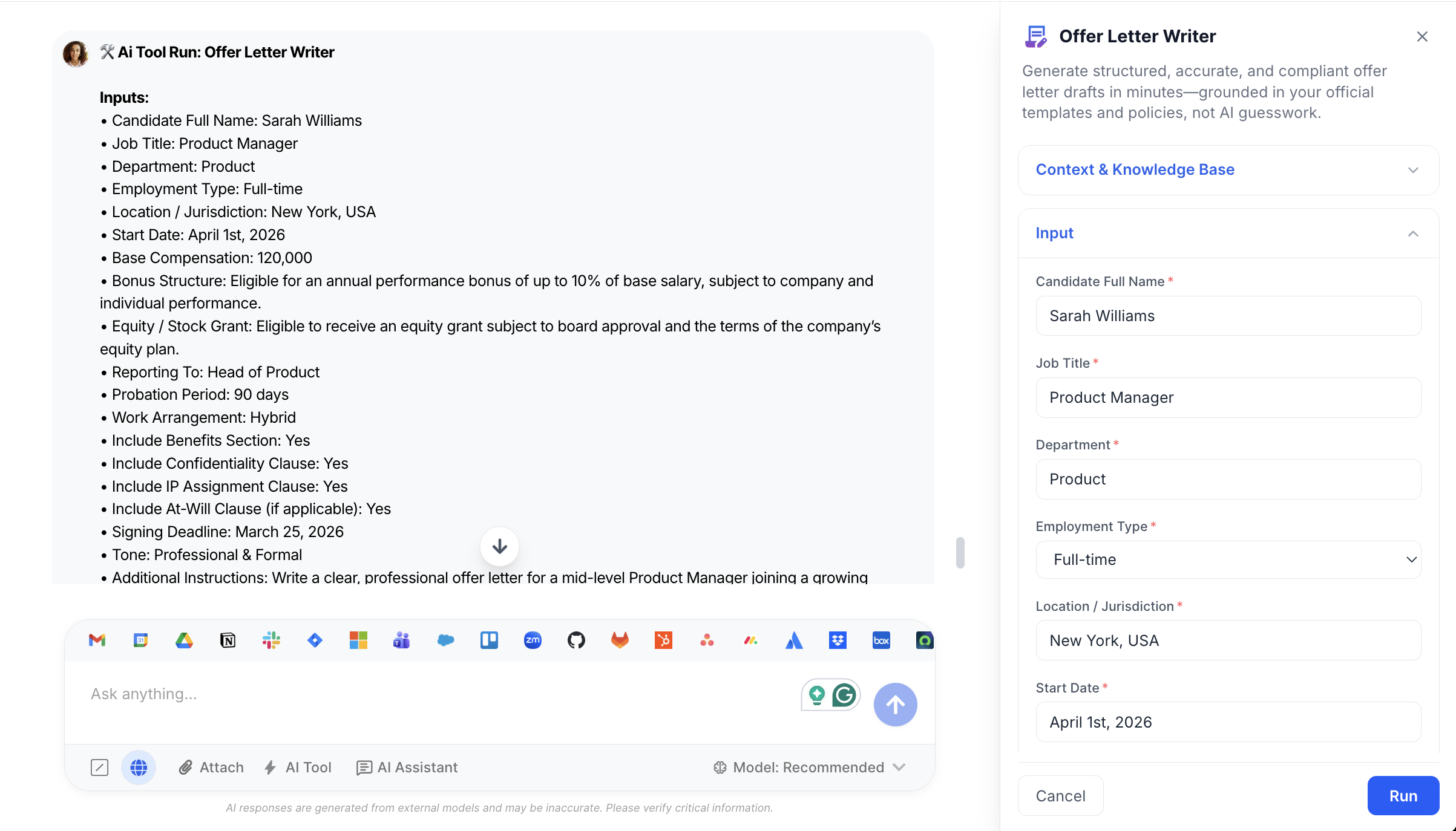
Provide the candidate, role, and compensation details; Offer Letter Writer handles the rest while staying within your templates and policies.

Required

  • Candidate Full Name – The candidate’s legal name to be used in the greeting and throughout the letter.
  • Job Title – The exact position being offered (e.g., Senior Product Manager).
  • Department – The functional area for the role (e.g., Engineering, Sales, Marketing, People).
  • Employment Type – How the role is classified: Full-time (default), Part-time, Contract, Internship, Temporary
  • Location / Jurisdiction – Country and/or state where the employment is based; critical for jurisdiction‑aware wording.
  • Start Date – The proposed start date for the candidate.
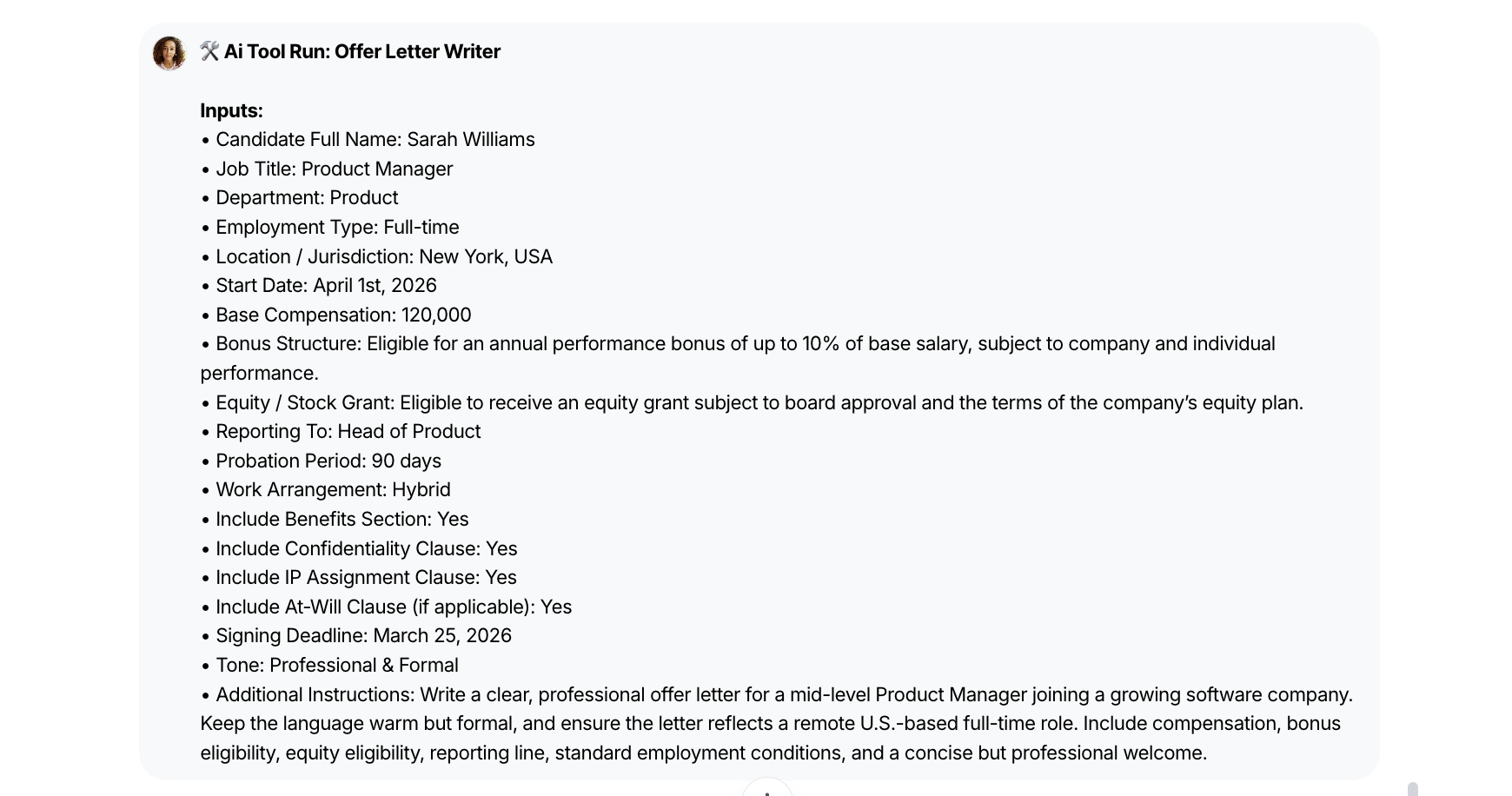
  • Base Compensation – Exact salary, hourly rate, or stipend to be included (no calculations or changes applied by the tool).

Advanced (Optional)

  • Bonus Structure – Description of any bonus eligibility or structure to be referenced; if not provided, none is added.
  • Equity / Stock Grant – Details of any equity component to be included; if absent, equity is not mentioned.
  • Reporting To – The manager’s title or name (e.g., “VP of Engineering”) for the reporting line section.
  • Probation Period – Length and terms of any probation period to be included if your policy uses one.
  • Work Arrangement – Where and how the candidate will work: Remote (default), Hybrid, On‑site
  • Include Benefits Section – Toggle (Default: ON) to include a benefits section using your official benefits wording.
  • Include Confidentiality Clause – Toggle (Default: ON) to add your approved confidentiality language.
  • Include IP Assignment Clause – Toggle (Default: ON) to add your standard IP assignment clause.
  • Include At‑Will Clause (If Applicable) – Toggle (Default: Auto) to include at‑will language where relevant and available in your templates.
  • Signing Deadline – Date or timeframe for the candidate to accept the offer.
  • Tone – Choose how the letter reads while staying professional and compliant: Professional & Formal (default), Warm & Welcoming, Executive‑Level

Output

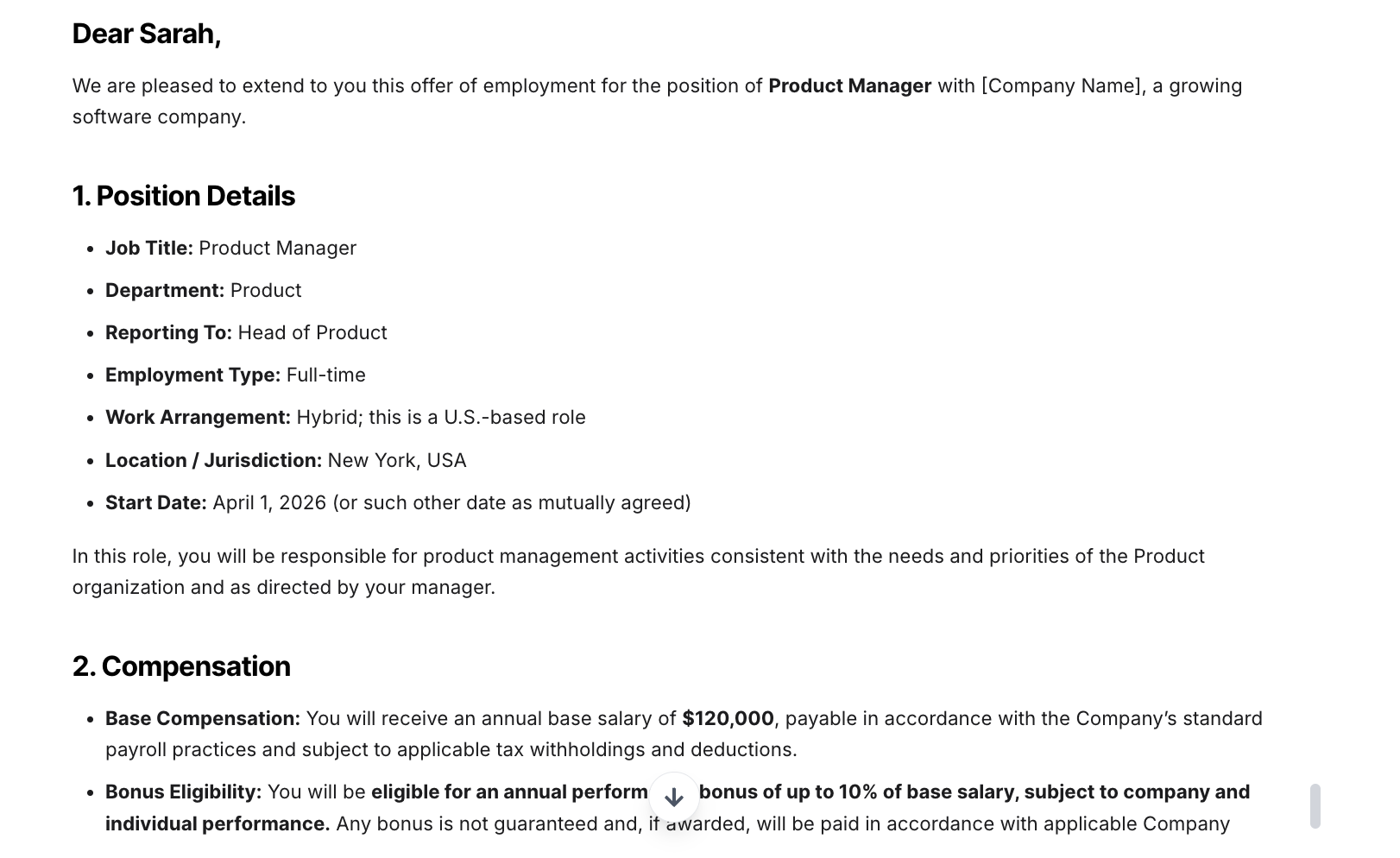
Offer Letter Writer returns a fully formatted offer letter draft that follows your structure and language as closely as possible.

  • Template‑Aligned Structure – If an official template is provided, the draft matches its sections and sequence exactly, updating only placeholders with your inputs.
  • Greeting & Candidate Details – Personalized greeting and clear identification of the candidate and offered role.
  • Role & Position Details – Job title, department, reporting line (if provided), and start date described clearly.
  • Compensation Section – Base compensation stated exactly as entered, with optional bonus and equity details only when provided.
  • Employment Classification & Work Arrangement – Language reflecting the selected employment type and remote/hybrid/on‑site setup.
  • Benefits Section – If enabled, benefits are described using your official benefits language; if no benefits doc exists, a neutral placeholder such as “Benefits will be provided according to company policy” is used instead of invented details.
  • Confidentiality & IP Clauses – If toggles are ON and clauses exist in your templates, the draft includes your standard confidentiality and IP assignment language verbatim.
  • Employment Terms & At‑Will (If Applicable) – Jurisdiction‑appropriate, template‑based employment terms; at‑will language appears only when enabled and available in your templates.
  • Probation Period (If Provided) – Inclusion of probation terms following your official probation policy wording.
  • Acceptance Instructions & Signing Deadline – Clear instructions for signing and any specified deadline for acceptance.
  • Professional Closing – A polished closing aligned with your company’s tone (e.g., HR, Talent, or hiring manager signature blocks).

The output is a clean, ready‑to‑review draft with no AI commentary before or after the letter.

Execution Insights

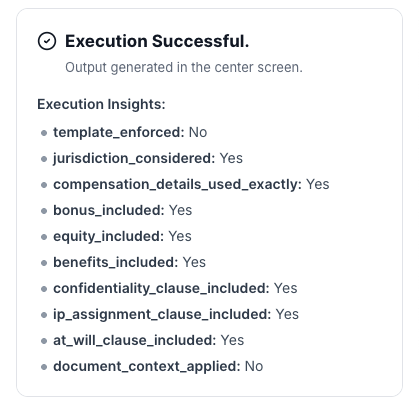
For HR ops and admins (not part of the candidate‑facing letter), Offer Letter Writer generates a small metadata block describing how the draft was produced:

  • template_enforced – Whether an official offer template was detected and followed (Yes / No).
  • jurisdiction_considered – Whether the jurisdiction/location influenced the wording (Yes / No).
  • compensation_details_used_exactly – Confirms that entered compensation values were used as‑is (Yes / No).
  • bonus_included – Whether a bonus section was included (Yes / No).
  • equity_included – Whether equity details were included (Yes / No).
  • benefits_included – Whether a benefits section was present (Yes / No).
  • confidentiality_clause_included – Whether the confidentiality clause was added (Yes / No).
  • ip_assignment_clause_included – Whether the IP assignment clause was added (Yes / No).
  • at_will_clause_included – Whether at‑will language was included (Yes / No).
  • document_context_applied – Whether uploaded templates and policies were actively used (Yes / No).

This makes the process auditable and helps HR and Legal confirm that offers follow policy.


Who is this for?

  • HR and People Ops teams creating offers at scale
  • Talent acquisition and recruiting teams preparing fast, accurate drafts
  • Hiring managers who need structured offers without editing legal language
  • Legal teams who want guardrails that keep AI‑generated drafts inside approved templates

Data & Permissions

Offer Letter Writer only uses the information inside your WorkLLM workspace and the fields you provide per run.

  • Org‑Scoped Workspace – All templates, policies, and generated offer letters are stored within your organization’s secure WorkLLM workspace; nothing is shared across customers.
  • Document‑Driven Context – The tool reads your uploaded offer templates, benefits policies, compensation guidelines, and clause libraries to shape drafts, but does not change these source documents.
  • Per‑Run Inputs – Candidate name, compensation, dates, and other details are used solely to produce that specific draft.
  • No Unsolicited Integrations – It does not auto‑pull data from your ATS, HRIS, or payroll systems unless your admins explicitly integrate and provide such data.
  • Access Control by Role – Who can generate, view, or edit offer drafts is governed by your workspace permissions (e.g., only HR, Talent, or specific hiring managers).

Security

  • All uploaded documents and inputs remain within your organization’s secure WorkLLM workspace.
  • No data is shared externally or used to train third-party models.
  • Enterprise-grade encryption and role-based access controls apply to all content and runs.

Governance

WorkLLM provides structure, control, and consistency across every execution.

  • Tool Logic: Managed by WorkLLM
  • Default Context: Managed by Head of People / HR Director / Talent Acquisition Lead
  • Visibility: Organization-wide
  • User Customization: Input-level only

This ensures standardized outputs across teams while still allowing flexibility at execution time.

Similar AI Tools

Brand Guidelines Creator

By: WorkLLM

Create comprehensive, actionable brand voice guidelines that ensure consistency across all marketing, sales, support, and AI-assisted content.

Press Release Writer

By: WorkLLM

Generate professional, publication-ready press releases that align with your brand voice, follow journalistic standards, and maintain credibility across all distribution channels.

Abandoned Cart Email Sequence Writer

By: WorkLLM

Generate high-converting, brand-aligned abandoned cart email sequences that recover revenue while maintaining customer trust and compliance.

Marketing Budget Planner

By: WorkLLM

Create a data-driven marketing budget allocation plan that optimizes performance, aligns with your objectives, and respects financial constraints.

Client Proposal Generator

By: WorkLLM

Create structured, persuasive, and commercially realistic client proposals in minutes—aligned with your real pricing, services, and legal terms, not AI guesswork.

Tone Controlled Response Tool

By: WorkLLM

Rewrite any message into the exact tone you need—on‑brand, de‑risked, and ready to send for support, internal comms, or executive use.

Happy Customers

Customer satisfaction is our major goal. See what our customers are saying about us.





