
Access Controls
- User-level access
- Access can be revoked anytime
Security
- Secure connection
- No automaded posting
Permissions
- Manage issues
- Transition issues
- Create sprints
- Update boards
Overview
Features
Natural language issue management
Smart search & filters
Sprint & Board Management
Roadmap & epic handling
Cross-team Status Reporting
Workflow Aware Automation
Use Cases with examples

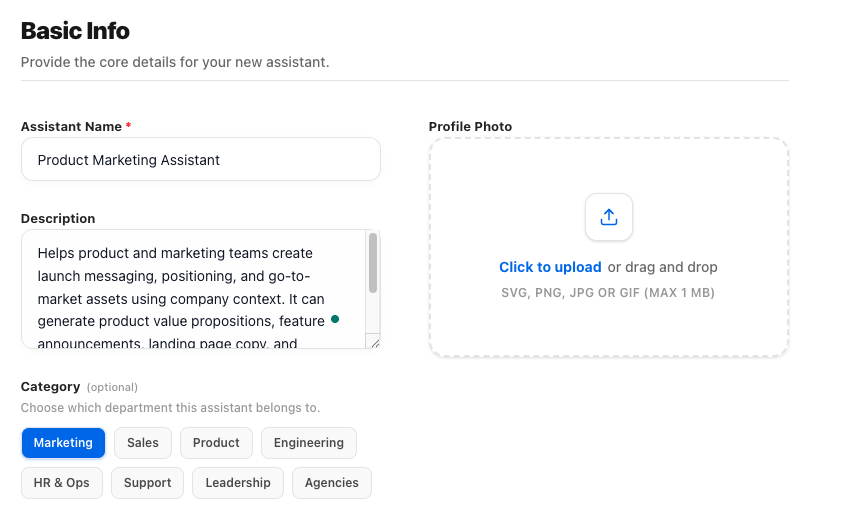
1) Basic info
Give your assistant a clear name and purpose so everyone knows when and how to use it. This sets expectations before the first question is even asked.
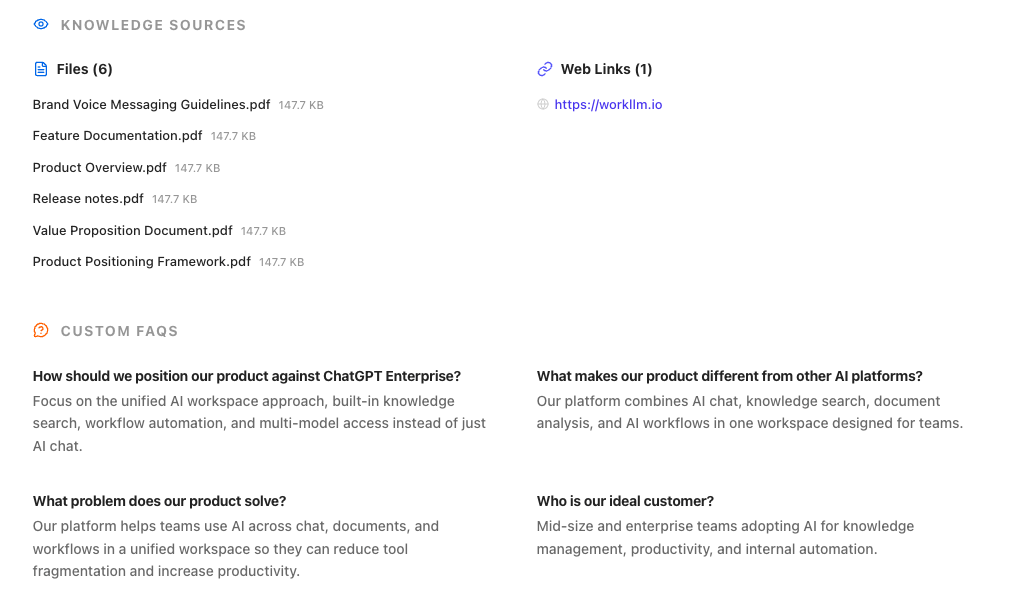
2) Knowledge sources
Connect documents, links, FAQs, or tools your assistant should rely on. The assistant answers based on your knowledge — not generic internet guesses

3) Basic info
Give your assistant a clear name and purpose so everyone knows when and how to use it. This sets expectations before the first question is even asked.

4) Knowledge sources
Connect documents, links, FAQs, or tools your assistant should rely on. The assistant answers based on your knowledge — not generic internet guesses
FAQs
What can WorkLLM do with Jira?
WorkLLM can create, read, update, and transition issues; manage epics and links; help with sprint and board operations; and generate summaries and status reports from your Jira data—through simple natural language prompts. This builds on Jira’s role as a central hub for planning and tracking work.
Does it work with both classic and next‑gen projects?
Yes. WorkLLM is designed to work across Jira Software projects, including classic and next‑gen/“team‑managed” projects, which are built to let teams configure workflows and features independently.
Can WorkLLM change my Jira workflows or project settings?
No. WorkLLM operates within your existing Jira configuration. It can execute actions allowed by your Jira permissions (like transitioning issues or editing fields), but it doesn’t change workflows, schemes, or global project configurations on its own.
How does permissions and access control work?
WorkLLM uses your own Jira user account via secure API access. It can only see and do what your Jira permissions allow—if you can’t view a project or edit a field in Jira, neither can WorkLLM. Jira’s native permission model and project roles remain the source of truth.
Can WorkLLM manage sprints and boards?
Yes. Within the limits of your Jira permissions, you can ask WorkLLM to start/complete sprints, move issues between columns, reorder issues, and get board-level summaries, aligning with Jira’s agile planning and tracking features.
Does the integration support Jira roadmaps and epics?
WorkLLM can create and update epics, link stories or tasks under them, and summarize roadmap progress—especially useful with Jira’s roadmap features in next‑gen (team-managed) projects.
Will WorkLLM create or delete projects in Jira?
No. Project-level administration (creating/deleting projects, changing schemes, etc.) remains in Jira’s admin UI. WorkLLM focuses on day‑to‑day work management inside projects—issues, sprints, epics, and reporting.
Does WorkLLM store my Jira issues or project data?
WorkLLM may temporarily process and cache Jira data to fulfill your requests (e.g., when generating summaries or status reports), but data use is scoped to your workspace and not repurposed for other customers. Long‑term retention and logs follow your workspace and compliance settings.
Can my teammates see everything WorkLLM pulls from Jira?
No, not automatically. Data surfaced via WorkLLM is only visible in the context where it’s requested (e.g., your private chat or a shared space). Underlying visibility still follows Jira’s own permissions—users cannot see issues or projects they don’t have access to in Jira.
Is there an extra Jira license or cost needed for the integration?
Each person using the integration needs a standard Jira account with the appropriate product license (e.g., Jira Software). There is typically no separate Atlassian charge for enabling next‑gen features or basic roadmap functionality, though your WorkLLM plan may govern how many Jira users or actions are supported.
Data & Permissions
WorkLLM connects to Jira using only the permissions required for issue work:
- Read issues, projects, boards, and basic configuration metadata
- Create new issues in projects you specify
- Update issue fields, comments, and status only when requested
- Add comments or internal notes on your behalf
How Data Is Used
When you run a Jira command:
- Issue and project data is retrieved securely through Jira’s API
- Content is processed to draft tickets, summaries, updates, or reports
- The result is shown in your workspace chat and, when approved, synced back to Jira
- No issue is created, transitioned, or edited without explicit confirmation
Security Deep Dive
- Secure authentication using API tokens or OAuth (depending on your Jira setup)
- Actions are performed under your Jira account’s existing permissions
- No bulk destructive operations (like mass delete or project removal)
- Access tokens can be revoked anytime from Jira or WorkLLM
Similar Integrations
Happy Customers
Customer satisfaction is our major goal. See what our customers are saying about us.
“Vivamus sagittis lacus vel augue laoreet rutrum faucibus dolor auctor. Vestibulum id ligula porta felis euismod semper. Cras justo odio dapibus facilisis sociis natoque penatibus.”

![]()
Coriss Ambady
Financial Analyst ABC.com
“Vivamus sagittis lacus vel augue laoreet rutrum faucibus dolor auctor. Vestibulum id ligula porta felis euismod semper. Cras justo odio dapibus facilisis sociis natoque penatibus.”

![]()
Cory Zamora
Marketing Specialist ABC.com
“Vivamus sagittis lacus vel augue laoreet rutrum faucibus dolor auctor. Vestibulum id ligula porta felis euismod semper. Cras justo odio dapibus facilisis sociis natoque penatibus.”

![]()
Nikolas Brooten
Sales Specialist Financial Analyst ABC.com
“Vivamus sagittis lacus vel augue laoreet rutrum faucibus dolor auctor. Vestibulum id ligula porta felis euismod semper. Cras justo odio dapibus facilisis sociis natoque penatibus.”

![]()
Coriss Ambady
Financial Analyst Financial Analyst ABC.com
“Vivamus sagittis lacus vel augue laoreet rutrum faucibus dolor auctor. Vestibulum id ligula porta felis euismod semper. Cras justo odio dapibus facilisis sociis natoque penatibus.”

![]()
Jackie Sanders
Investment Planner Financial Analyst ABC.com
“Vivamus sagittis lacus vel augue laoreet rutrum faucibus dolor auctor. Vestibulum id ligula porta felis euismod semper. Cras justo odio dapibus facilisis sociis natoque penatibus.”

![]()
Laura Widerski
Sales Specialist Financial Analyst ABC.com
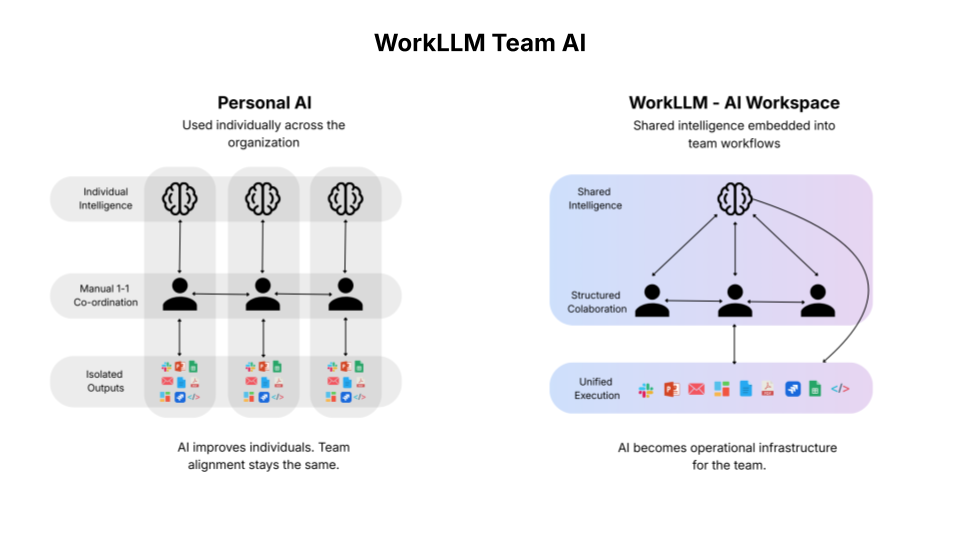
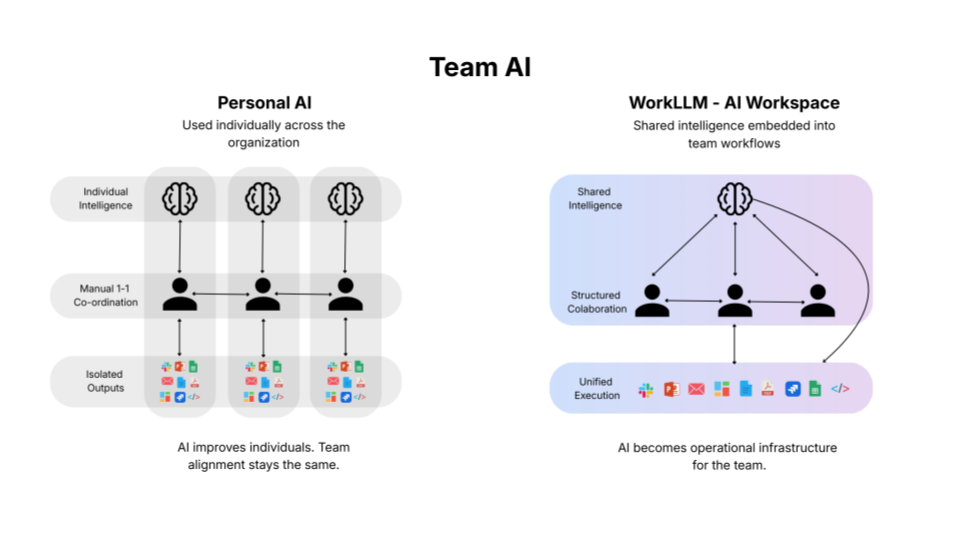
See how WorkLLM fits your team
Explore how a shared AI workspace keeps context, collaboration, and execution connected.