
AI Tool: Job Description Writer

Create clear, level‑appropriate, ATS‑friendly job descriptions that match your brand and hiring standards.

Pricing

Included in paid plans.

Provided By

WorkLLM

Category

Content, HR

Tool Owner

Head of People / Talent Acquisition Lead / HR / People Ops

Owner Role

Keeps mission, values, employer brand, leveling, competencies, benefits, and D&I guidelines up to date so every JD is on‑brand, inclusive, and properly leveled.

AI Tool Logic

Managed by WorkLLM

LLM Compatibility

Model Agnostic. Works with any Text based Models.

Description

Job Description Writer acts like a senior talent acquisition specialist and hiring manager. It generates structured, ATS‑friendly JDs that align with your employer brand, calibrate expectations by level, separate must‑have and nice‑to‑have skills, and avoid biased or buzzword‑heavy language—while staying outcome‑oriented and realistic about scope.

Context & Knowledge Base

Upload a few core documents once so every JD stays consistent and compliant.

Strongly recommended

  • Company Mission & Values – Grounds the role in what the company stands for.
  • Employer Brand / Careers Page Copy – Mirrors your public hiring voice and positioning.
  • Compensation Philosophy – Guides how ranges and pay positioning are described.
  • Diversity & Inclusion Guidelines – Ensures inclusive, bias‑aware language in every JD.
  • Hiring Framework / Leveling Matrix – Calibrates expectations by level (Intern → VP).
  • Competency Framework – Anchors responsibilities and qualifications in core competencies.
  • Standard Benefits Description – Keeps benefits messaging accurate and consistent.

Optional but powerful

  • Previous High‑Performing Job Descriptions – Shows what “great” looks like in your org.
  • Interview Evaluation Rubric – Aligns JD requirements with how you’ll actually assess candidates.
  • Team Charter / Operating Model – Adds real team context and ways of working.
  • Location / Remote Policy – Clarifies expectations around remote, hybrid, or on‑site work.

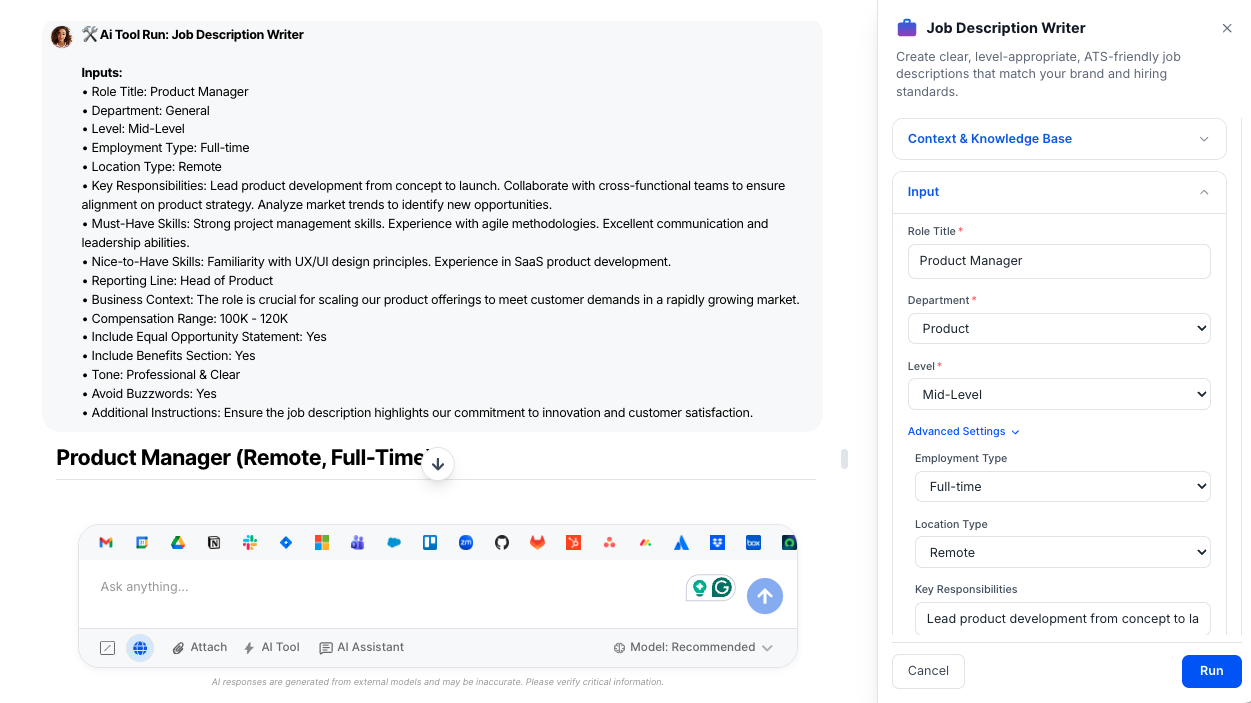
Input

Provide a few hiring details and Job Description Writer builds a complete, calibrated JD.

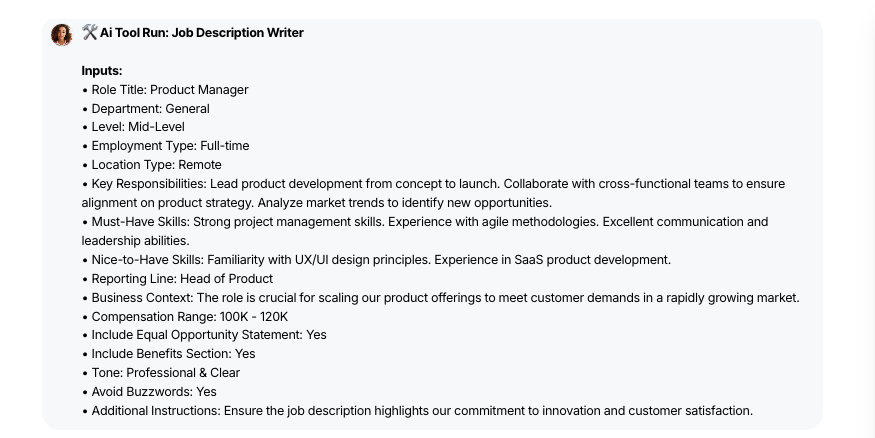
  • Role Title (Required) – The position name you’re hiring for (e.g., Senior Backend Engineer).
  • Department (Required) – The functional area (e.g., Product, Engineering, Marketing, Sales, HR, etc.).
  • Level (Required) – Seniority band (Intern to VP) to set scope, autonomy, and expectations.
  • Employment Type (Optional) – Whether the role is Full‑time, Part‑time, Contract, Internship, or Temporary.
  • Location Type (Optional) – How and where the role is based (Remote, Hybrid, On‑site, Global).
  • Key Responsibilities (Optional) – Any must‑cover responsibilities or focus areas to highlight.
  • Must‑Have Skills (Optional) – Non‑negotiable skills, experience, or qualifications.
  • Nice‑to‑Have Skills (Optional) – Bonus skills that are helpful but not required.
  • Reporting Line (Optional) – Who this role reports to (e.g., Director of Product, VP Engineering).
  • Business Context (Optional) – Why this role exists (team growth, new product, replacement, scaling).
  • Compensation Range (Optional) – Salary or total compensation range to include if you choose.
  • Include Equal Opportunity Statement (Optional) – Toggle to add a standardized inclusive EEO statement.
  • Include Benefits Section (Optional) – Toggle to include a benefits summary using your standard language.
  • Tone (Optional) – Choose from Professional & Clear, Modern & Engaging, Bold & Growth‑Focused, Formal Corporate, or Startup & Energetic.
  • Avoid Buzzwords (Optional) – Toggle to automatically remove terms like “rockstar,” “ninja,” or “guru.”

Output

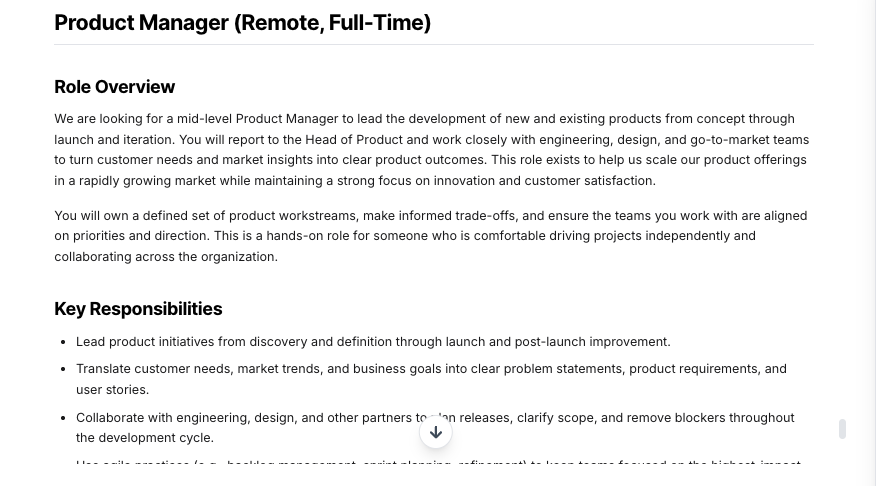
Get a complete, structured job description that’s ready to publish on your careers page or ATS.

  • Role Overview – A short summary of what the role does, why it matters, and (optionally) who it reports to.
  • Key Responsibilities – Clear, outcome‑focused bullet points outlining what success looks like day to day.
  • Required Qualifications – Must‑have skills, experience, and capabilities aligned to the selected level.
  • Preferred Qualifications – Nice‑to‑have skills and experiences that help candidates self‑select.
  • What Success Looks Like – Optional 30–60–90 day or early success expectations for the role.
  • Compensation – A transparent range section when a compensation range is provided.
  • Benefits – A concise benefits summary using your standard language when enabled.
  • Equal Opportunity Statement – A consistent, inclusive EEO statement when enabled.
  • Level‑Calibrated Expectations – Responsibilities and scope adjusted for Intern, Junior, Mid‑Level, Senior, Lead, Manager, Director, or VP.
  • Inclusive, Buzzword‑Free Language – Bias‑aware, plain language that avoids gendered terms and cliché buzzwords (when enabled).
  • ATS‑Friendly Structure – Clearly labeled sections and clean formatting optimized for job boards and applicant tracking systems.

Execution Insights

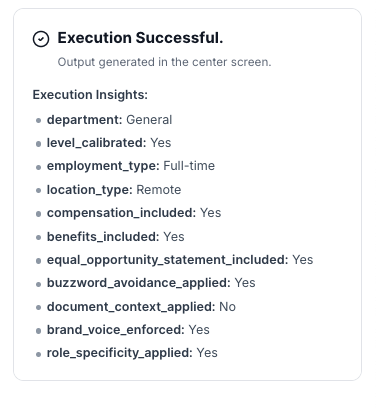
Each run also produces a small metadata block (for admins and HR ops, not shown in the JD):

  • Department & Level Calibrated – Confirms which department and level were applied and if calibration was used.
  • Employment & Location Type – Captures how the role is categorized and where it can be based.
  • Compensation / Benefits / EEO Included – Flags whether these sections were added to the JD.
  • Buzzword Avoidance Applied – Indicates if buzzword filtering was turned on and enforced.
  • Document Context & Brand Voice – Shows whether uploaded company docs and voice guidelines were applied.

Who is this for?

  • Talent acquisition and recruiting teams
  • HR and People Ops teams
  • Hiring managers and team leads
  • Founders and small teams formalizing hiring for the first time

Data & Permissions

Job Description Writer only works with the information you and your organization choose to provide.

  • Org‑scoped workspace – All inputs, attachments, and generated job descriptions live inside your organization’s WorkLLM workspace; nothing is stored or processed in public/shared spaces.
  • Document‑based context – The tool uses your uploaded employer brand, leveling, D&I, compensation, and benefits docs to shape JDs so they stay accurate and consistent.
  • Per‑run inputs – Role title, department, level, location, and any custom notes you enter are used only to generate that specific JD.
  • No unsolicited integrations – The tool does not automatically pull from external systems (ATS, HRIS, etc.) unless you explicitly provide that content or your admins wire it up.
  • Org‑controlled access – Who can view or edit generated JDs is governed by your existing Workspace permissions and role settings.

Security

  • All uploaded documents and inputs remain within your organization’s secure WorkLLM workspace.
  • No data is shared externally or used to train third-party models.
  • Enterprise-grade encryption and role-based access controls apply to all content and runs.

Governance

WorkLLM provides structure, control, and consistency across every execution.

  • Tool Logic: Managed by WorkLLM
  • Default Context: Managed by Head of People / Talent Acquisition Lead / HR / People Ops.
  • Visibility: Organization-wide
  • User Customization: Input-level only

This ensures standardized outputs across teams while still allowing flexibility at execution time.

Similar AI Tools

Brand Guidelines Creator

By: WorkLLM

Create comprehensive, actionable brand voice guidelines that ensure consistency across all marketing, sales, support, and AI-assisted content.

Press Release Writer

By: WorkLLM

Generate professional, publication-ready press releases that align with your brand voice, follow journalistic standards, and maintain credibility across all distribution channels.

Abandoned Cart Email Sequence Writer

By: WorkLLM

Generate high-converting, brand-aligned abandoned cart email sequences that recover revenue while maintaining customer trust and compliance.

Marketing Budget Planner

By: WorkLLM

Create a data-driven marketing budget allocation plan that optimizes performance, aligns with your objectives, and respects financial constraints.

Client Proposal Generator

By: WorkLLM

Create structured, persuasive, and commercially realistic client proposals in minutes—aligned with your real pricing, services, and legal terms, not AI guesswork.

Tone Controlled Response Tool

By: WorkLLM

Rewrite any message into the exact tone you need—on‑brand, de‑risked, and ready to send for support, internal comms, or executive use.

Happy Customers

Customer satisfaction is our major goal. See what our customers are saying about us.





