



AI Tool: Tone Controlled Response Tool
Pricing
Provided By
Category
Tool Owner
Owner Role
AI Tool Logic
LLM Compatibility


Description
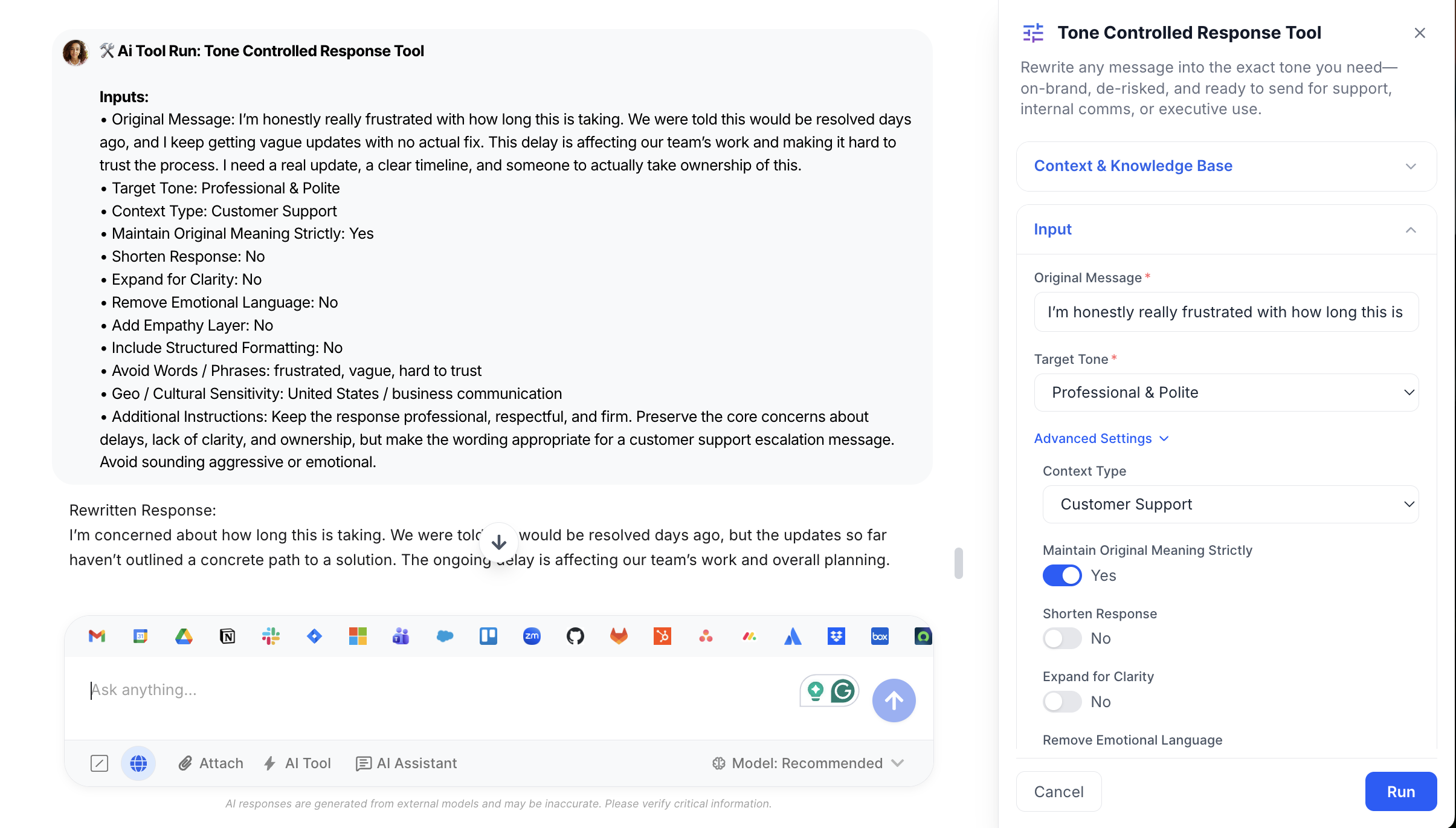
Tone-Controlled Response Tool acts like a senior communications specialist sitting beside every teammate. You paste a draft response, choose the tone and context, and the tool rewrites it to:
- Match the selected tone (e.g., Empathetic, Executive-Level, Calm & De-escalating)
- Preserve the original meaning and commitments (unless you explicitly relax this)
- Enforce your brand voice, support/exec comms standards, and legal/sensitive language rules
- Remove risky or inflammatory phrasing and avoid unnecessary escalation
It’s built for customer support, internal comms, and leaders who need fast, polished replies—without sacrificing control or increasing risk.
Context & Knowledge Base
The more communication guidance you connect, the more consistent and risk‑aware the tool becomes.
Strongly Recommended
- Brand Voice & Tone Guide – Defines how your company sounds in writing across channels.
- Customer Support Communication Standards – How agents should respond, escalate, apologize, and close loops.
- Escalation Guidelines – When and how to escalate, what language to avoid, and what must never be promised.
- Legal / Compliance Restrictions – Phrases to avoid, legal positions, and disclaimers that must be respected.
- Sensitive Language Guidelines – Rules around vulnerable customers, sensitive topics, and protected groups.
- Crisis Communication Framework – Additional guardrails for high‑risk, PR‑sensitive, or incident‑related responses.
Optional but Powerful
- Sample Approved Responses – High‑quality examples the tool can mirror for style and structure.
- Regional Communication Guidelines – Local norms for tone, directness, and formality by country/region.
- Cultural Sensitivity Guidelines – Nuances and “do/don’t” lists for specific cultures or markets.
- Executive Communication Standards – How leadership messages differ from standard internal comms.
These documents drive:
- Brand and tone consistency
- Reduced legal/regulatory risk
- Clear, professional, repeatable wording across teams and regions
Input
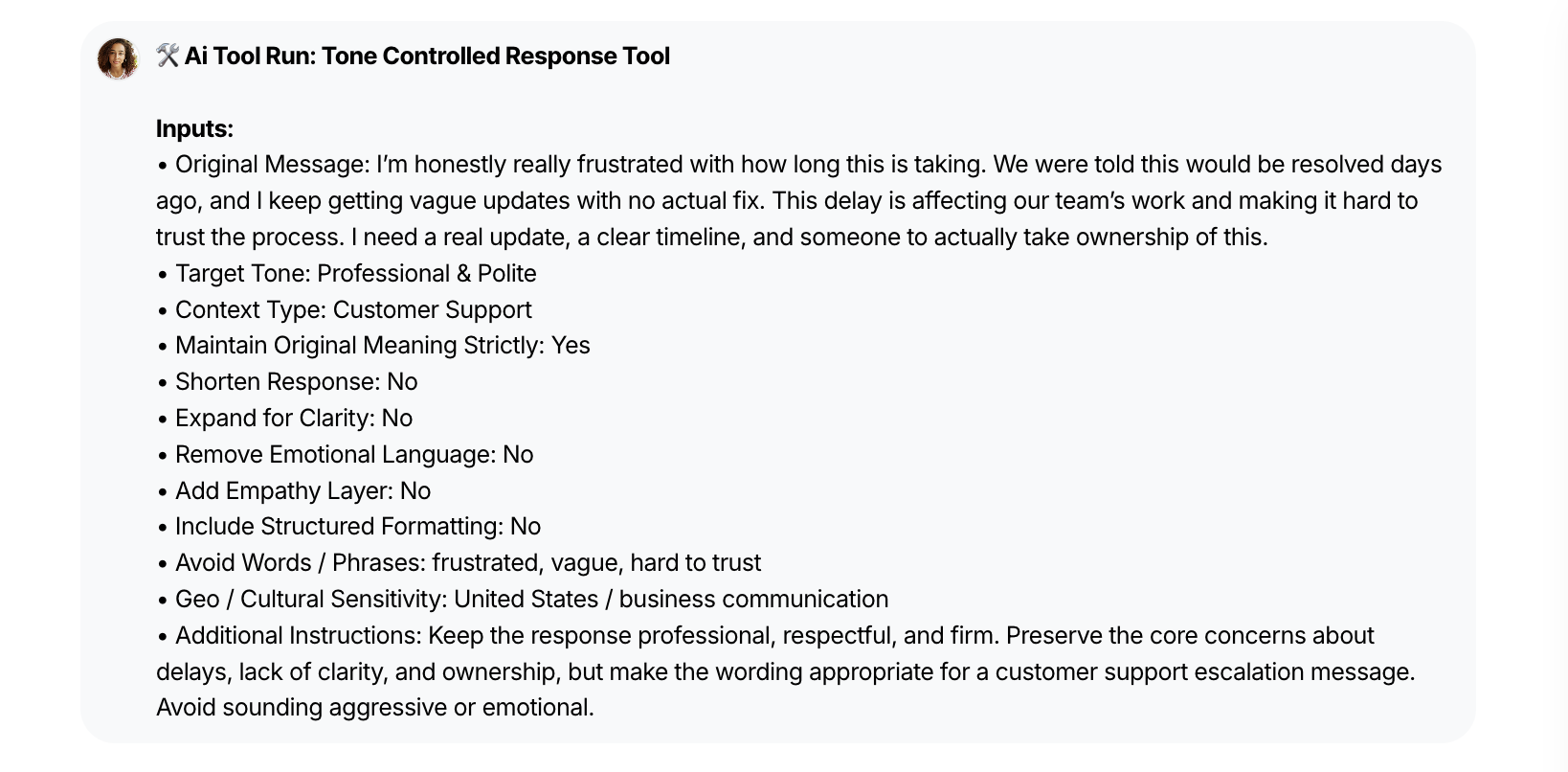
Paste your draft message, choose the tone and context, and optionally fine‑tune how much the tool can change.
- Original Message – The text you want rewritten.
- Target Tone – How you want it to sound (e.g., empathetic, executive‑level, de‑escalating).
- Context Type – Where the message will be used (support, internal, executive, public, etc.).
- Maintain Original Meaning – Toggle to strictly preserve all facts, promises, and key details.
- Shorten Response – Condense the message while keeping the core point intact.
- Expand for Clarity – Add brief clarifications or transitions for easier reading.
- Remove Emotional Language – Strip out emotionally charged or escalatory wording.
- Add Empathy Layer – Insert a clear, early acknowledgement of feelings or impact.
- Structured Formatting – Turn dense text into skimmable bullets or short sections.
- Avoid Words / Phrases – Exclude specific terms you don’t want the tool to use.
- Geo / Cultural Notes – Indicate region or culture so tone matches local norms.
Output
Get a ready‑to‑send response in the exact tone you chose, plus lightweight internal metadata for quality control.
- Rewritten Response – Final, polished message in the selected tone, ready to paste into your channel.
- Meaning Preservation Status – Indicates whether the original meaning was kept strictly or lightly restructured.
- Length & Structure Changes – Notes if the message was shortened, expanded, or reformatted for readability.
- Empathy & Emotion Adjustments – Shows whether empathy was added or emotional language was removed.
- Risk & Compliance Filtering – Confirms that risky, blaming, or non‑compliant language was softened or removed.
- Brand & Guideline Alignment – Confirms that brand voice and communication guidelines were applied.
- Execution Metadata (Internal) – Compact, behind‑the‑scenes metadata for QA, coaching, and audits (never shown to recipients).
Execution Insights
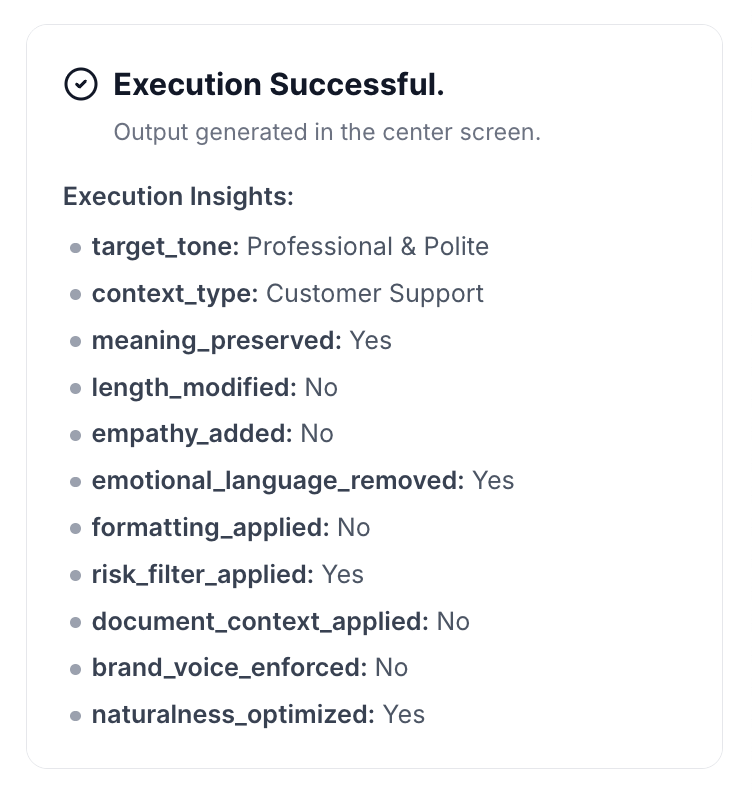
Each run also produces a small metadata block (for admins, leads, and QA—not shown to end recipients):
- target_tone → The selected tone (e.g., Empathetic).
- context_type → Where the message is meant to be used (e.g., Customer Support).
- meaning_preserved → Yes / No, based on “Maintain Original Meaning Strictly”.
- length_modified → Shortened / Expanded / No.
- empathy_added → Yes / No (whether empathy layer was added).
- emotional_language_removed → Yes / No.
- formatting_applied → Yes / No (whether structured formatting was applied).
- risk_filter_applied → Yes / No (if risk filtering changed the message).
- document_context_applied → Yes / No (if brand/guideline docs were used).
- brand_voice_enforced → Yes / No (if brand voice rules influenced the rewrite).
This makes communication quality and compliance auditable at scale.
Who is this for?
- Customer support and success agents
- Support team leads and QA
- Internal communications and HR/People teams
- Sales and account management teams
- Executives and chiefs of staff
- PR, legal, and risk teams overseeing public or crisis‑related responses
Data & Permissions
Tone-Controlled Response Tool only operates on content and documents inside your organization’s WorkLLM workspace.
- Org-Scoped Workspace – Original messages, rewritten responses, and communication guidelines all live inside your secure workspace; nothing is shared across customers.
- Document-Driven Context – Brand voice, support standards, escalation rules, legal/compliance docs, and sensitivity guidelines are read at runtime to shape responses but are never modified.
- Per-Run Inputs – The message you paste, selected tone, toggles, and any geo/cultural notes are used only to generate that specific rewrite.
- No Unsolicited Integrations – The tool doesn’t automatically connect to your helpdesk, email, chat, or CRM unless your admins explicitly integrate those systems.
- Access Controlled by Roles – Who can use the tool—and who can see specific runs—is governed by your existing workspace permission model (e.g., support agents vs. exec team vs. legal).
Security
- All uploaded documents and inputs remain within your organization’s secure WorkLLM workspace.
- No data is shared externally or used to train third-party models.
- Enterprise-grade encryption and role-based access controls apply to all content and runs.
Governance
WorkLLM provides structure, control, and consistency across every execution.
- Tool Logic: Managed by WorkLLM
- Default Context: Managed by Head of Customer Support / Head of Communication / Chief of Staff / Head of Legal / VP People
- Visibility: Organization-wide
- User Customization: Input-level only
This ensures standardized outputs across teams while still allowing flexibility at execution time.
Similar AI Tools
Happy Customers
Customer satisfaction is our major goal. See what our customers are saying about us.
“Vivamus sagittis lacus vel augue laoreet rutrum faucibus dolor auctor. Vestibulum id ligula porta felis euismod semper. Cras justo odio dapibus facilisis sociis natoque penatibus.”

![]()
Coriss Ambady
Financial Analyst ABC.com
“Vivamus sagittis lacus vel augue laoreet rutrum faucibus dolor auctor. Vestibulum id ligula porta felis euismod semper. Cras justo odio dapibus facilisis sociis natoque penatibus.”

![]()
Cory Zamora
Marketing Specialist ABC.com
“Vivamus sagittis lacus vel augue laoreet rutrum faucibus dolor auctor. Vestibulum id ligula porta felis euismod semper. Cras justo odio dapibus facilisis sociis natoque penatibus.”

![]()
Nikolas Brooten
Sales Specialist Financial Analyst ABC.com
“Vivamus sagittis lacus vel augue laoreet rutrum faucibus dolor auctor. Vestibulum id ligula porta felis euismod semper. Cras justo odio dapibus facilisis sociis natoque penatibus.”

![]()
Coriss Ambady
Financial Analyst Financial Analyst ABC.com
“Vivamus sagittis lacus vel augue laoreet rutrum faucibus dolor auctor. Vestibulum id ligula porta felis euismod semper. Cras justo odio dapibus facilisis sociis natoque penatibus.”

![]()
Jackie Sanders
Investment Planner Financial Analyst ABC.com
“Vivamus sagittis lacus vel augue laoreet rutrum faucibus dolor auctor. Vestibulum id ligula porta felis euismod semper. Cras justo odio dapibus facilisis sociis natoque penatibus.”

![]()
Laura Widerski
Sales Specialist Financial Analyst ABC.com
See how WorkLLM fits your team
Explore how a shared AI workspace keeps context, collaboration, and execution connected.