
AI Tool: Abandoned Cart Email Sequence Writer

Generate high-converting, brand-aligned abandoned cart email sequences that recover revenue while maintaining customer trust and compliance.

Pricing

Included in paid plans.

Provided By

WorkLLM

Category

Content, Email Marketing, Marketing

Tool Owner

Head of E-commerce / Email Marketing Manager / CRM Lead

Owner Role

Owns email templates, brand voice guidelines, product catalogs, discount policies, and compliance rules to ensure every abandoned cart sequence is on-brand, legally compliant, and conversion-optimized.

AI Tool Logic

Managed by WorkLLM

LLM Compatibility

Model Agnostic. Works with any Text based Models.

Description

The Abandoned Cart Email Sequence Writer acts as a senior e-commerce email strategist and conversion copywriter. It creates persuasive, multi-touch email sequences designed to recover abandoned shopping carts while respecting your brand voice, discount policies, and legal requirements.


Key capabilities include:

  • Generating complete email sequences (typically 3-5 emails) with strategic timing recommendations
  • Personalizing content based on cart value, product type, and customer segment
  • Incorporating approved incentives, social proof, and urgency tactics
  • Ensuring compliance with email marketing regulations (CAN-SPAM, GDPR, etc.)
  • Maintaining brand voice consistency across all touchpoints
  • Avoiding discount abuse and protecting margin integrity

The result is a ready-to-deploy email sequence that balances persuasion with professionalism.

Context & Knowledge Base

To maximize effectiveness and maintain brand integrity, the Tool Owner should upload and maintain:

Strongly Recommended (Critical)

  • Email Template Library – Your standard email layouts, header/footer elements, and structural formats
  • Brand Voice Guidelines – Tone, style, vocabulary, and messaging principles
  • Product Catalog – Product names, descriptions, categories, and key features
  • Discount & Incentive Policy – Approved discount levels, eligibility rules, and margin guardrails
  • Legal & Compliance Requirements – CAN-SPAM, GDPR, unsubscribe requirements, and regional regulations
  • Customer Segmentation Rules – How different customer types should be messaged differently
  • Cart Value Thresholds – When to adjust messaging based on cart size
  • Shipping & Return Policies – Standard policies to reference in emails

Optional but Powerful

  • High-Performing Email Examples – Past successful abandoned cart emails to mirror structure and approach
  • Product-Specific Messaging – Special positioning for high-value, seasonal, or new products
  • Customer Testimonials & Reviews – Approved social proof elements
  • Urgency & Scarcity Guidelines – How to ethically use time-sensitive messaging
  • Cross-Sell & Upsell Rules – When and how to suggest related products
  • Mobile Optimization Guidelines – Best practices for mobile-first email design
  • A/B Testing Results – Historical performance data on subject lines, CTAs, and incentive timing

Input

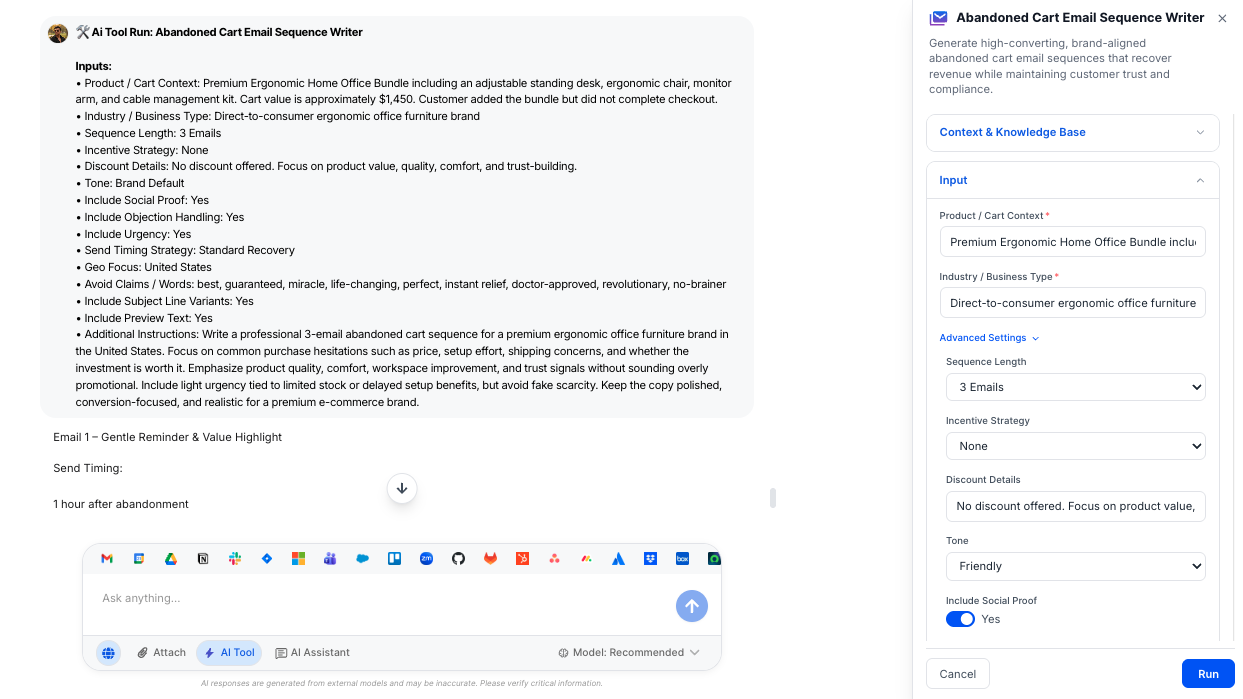
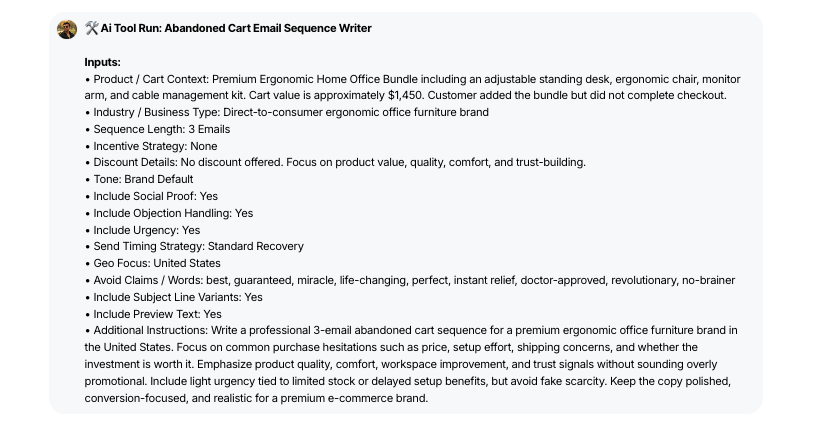
Provide cart details and strategic preferences to generate a tailored email sequence.

Required Inputs

  • Cart Value – Total value of abandoned items (numeric, currency)
  • Product Category – Primary category of abandoned items (e.g., Electronics, Apparel, Home Goods)
  • Customer Segment – Customer type for messaging customization: New Visitor (default), First-Time Buyer, Repeat Customer, VIP/High-Value Customer, Lapsed Customer, Unknown

Advanced Inputs (Optional)

  • Sequence Length – Number of emails in the sequence: 3 Emails (default) – Standard recovery sequence, 4 Emails – Extended nurture approach, 5 Emails – Maximum touch sequence, Custom – Specify exact number

  • Incentive Strategy – How to use discounts and offers:

    • No Incentive (default) – Reminder-based only
    • Progressive Incentive – Increasing discount over time
    • Single Incentive – One-time offer in specific email
    • Free Shipping Only – Shipping offer instead of discount
    • Custom – User-defined incentive approach
  • Maximum Discount Allowed – Cap on discount percentage (e.g., 15%)

  • Include Social Proof – Toggle to add testimonials, reviews, or trust signals (Default: ON)

  • Include Urgency Messaging – Toggle to add time-sensitive or scarcity elements (Default: ON)

  • Include Product Recommendations – Toggle to suggest related or complementary items (Default: OFF)

  • Tone Preference – Overall voice for the sequence: Friendly & Conversational (default), Professional & Direct, Luxury & Aspirational, Playful & Casual, Urgent & Action-Oriented

  • Email Timing Strategy – Recommended send intervals:

    • Standard (1hr, 24hr, 72hr) – Default timing
    • Aggressive (1hr, 6hr, 24hr) – Faster follow-up
    • Relaxed (24hr, 72hr, 7 days) – Gentler cadence
    • Custom – User defines specific timing
  • Primary CTA Focus – Main action you want recipients to take: Complete Purchase (default), Review Cart, Contact Support, Custom

  • Geographic/Compliance Region – Location-based compliance requirements: United States (CAN-SPAM), European Union (GDPR), Canada (CASL), Australia (Spam Act), Global/Multi-Region, Other

  • Special Considerations – Any product-specific notes, seasonal factors, or campaign context

Output

Receive a complete, deployment-ready email sequence with strategic guidance.

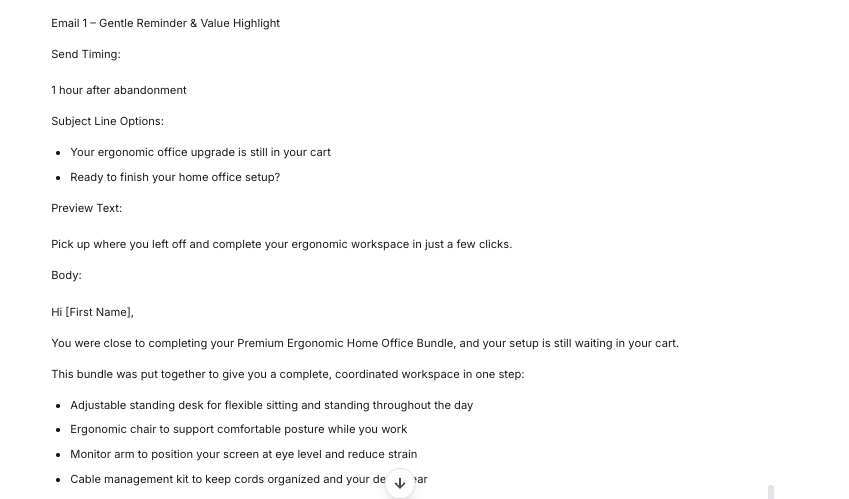
  • Complete Email Sequence – Full sequence of emails (typically 3-5) with subject lines, preview text, body copy, and CTAs
  • Email 1: Gentle Reminder – Initial touchpoint acknowledging the abandoned cart with low-pressure messaging
  • Email 2: Value Reinforcement – Emphasizes product benefits, social proof, and addresses potential objections
  • Email 3: Urgency & Incentive – Introduces time-sensitivity and (if applicable) incentive offers
  • Email 4 & 5 (if applicable) – Extended nurture emails with alternative angles or final opportunity messaging
  • Subject Line Variations – 2-3 alternative subject lines per email for A/B testing
  • Recommended Send Timing – Specific timing recommendations for each email (e.g., “Send 1 hour after abandonment”)
  • Personalization Tokens – Indicated merge fields for name, product, cart value, etc. (e.g., {{first_name}}, {{product_name}})
  • Mobile Optimization Notes – Specific guidance for mobile-friendly formatting
  • Compliance Checklist – Confirmation that required legal elements (unsubscribe, physical address, etc.) are included
  • Performance Optimization Tips – Strategic notes on testing, timing adjustments, or segment-specific variations

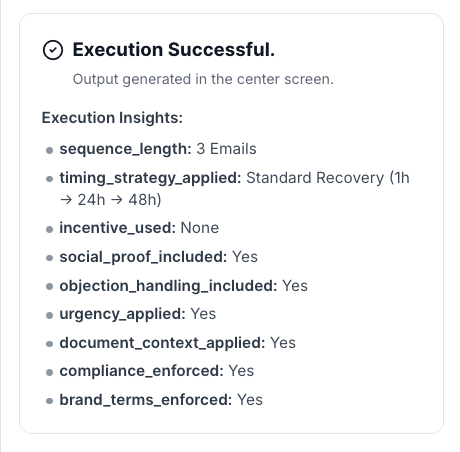
Execution Insights

Understand how the sequence was crafted and ensure it aligns with your strategy.

  • Sequence Length Generated – Number of emails created
  • Incentive Strategy Applied – Type of discount/offer strategy used
  • Maximum Discount Used – Highest discount percentage included (if any)
  • Social Proof Included – Confirms if testimonials or trust signals were added
  • Urgency Elements Included – Confirms if time-sensitive messaging was used
  • Product Recommendations Included – Indicates if cross-sell/upsell suggestions were added
  • Tone Applied – Voice and style used throughout sequence
  • Timing Strategy Applied – Send interval approach used
  • Compliance Region Applied – Geographic compliance framework followed
  • Brand Voice Alignment – Confirms adherence to brand guidelines
  • Discount Policy Compliance – Verifies discount stayed within approved limits
  • Document Context Applied – Indicates which uploaded documents informed the sequence
  • Personalization Depth – Level of customization based on customer segment and cart details
  • Mobile Optimization Applied – Confirms mobile-first design principles were followed

Who is this for?

  • E-commerce Marketing Teams – Automated cart recovery campaign creation
  • Email Marketing Managers – Conversion-optimized sequence development
  • CRM & Retention Specialists – Customer lifecycle messaging optimization
  • Digital Marketing Agencies – Client cart abandonment strategy and execution
  • E-commerce Operations – Revenue recovery automation and optimization
  • Small Business Owners – Professional email sequences without dedicated copywriters

Data & Permissions

Abandoned Cart Email Sequence Writer operates exclusively within your secure WorkLLM workspace.

  • Org-Scoped Workspace – Email templates, brand guidelines, product data, and generated sequences remain isolated to your organization and are never shared across customers.
  • Document-Driven Context – Reads your email templates, brand voice guidelines, discount policies, and compliance requirements at runtime but never modifies source documents.
  • Per-Run Inputs – Cart details, customer segments, and sequence preferences are used only for that specific email sequence generation.
  • No Automatic External Connections – The tool doesn’t automatically connect to your e-commerce platform, ESP, or CRM unless explicitly integrated by your admins.
  • Role-Based Access Control – Access to email sequence generation, brand assets, and discount policies is governed by your workspace permission model.

Security

  • All uploaded documents and inputs remain within your organization’s secure WorkLLM workspace.
  • No data is shared externally or used to train third-party models.
  • Enterprise-grade encryption and role-based access controls apply to all content and runs.

Governance

WorkLLM provides structure, control, and consistency across every execution.

  • Tool Logic: Managed by WorkLLM
  • Default Context: Managed by Head of E-commerce / Email Marketing Manager / CRM Lead
  • Visibility: Organization-wide
  • User Customization: Input-level only

This ensures standardized outputs across teams while still allowing flexibility at execution time.

Similar AI Tools

Brand Guidelines Creator

By: WorkLLM

Create comprehensive, actionable brand voice guidelines that ensure consistency across all marketing, sales, support, and AI-assisted content.

Press Release Writer

By: WorkLLM

Generate professional, publication-ready press releases that align with your brand voice, follow journalistic standards, and maintain credibility across all distribution channels.

Marketing Budget Planner

By: WorkLLM

Create a data-driven marketing budget allocation plan that optimizes performance, aligns with your objectives, and respects financial constraints.

Client Proposal Generator

By: WorkLLM

Create structured, persuasive, and commercially realistic client proposals in minutes—aligned with your real pricing, services, and legal terms, not AI guesswork.

Tone Controlled Response Tool

By: WorkLLM

Rewrite any message into the exact tone you need—on‑brand, de‑risked, and ready to send for support, internal comms, or executive use.

Offer Letter Writer

By: WorkLLM

Generate structured, accurate, and compliant offer letter drafts in minutes—grounded in your official templates and policies, not AI guesswork.

Happy Customers

Customer satisfaction is our major goal. See what our customers are saying about us.





