
Weekly Project Status Agent
Give clients their update without losing Friday afternoon. Each week, your AI agent gathers progress from your task app and time tracker, writes what was done, what is next and what needs a decision, and sends it after your approval.




Teams at 250+ customers use our platform
































check out our reviews


One AI agent for every weekly client update
The Weekly Project Status Update AI Agent collects the facts, writes the update, and sends it on schedule, so every client hears from you each week, even when your team is busy delivering work.
Gathers progress from your task app
Adds the hours from your time tracker
Writes a clear update in your agency’s tone
Sends it after your approval
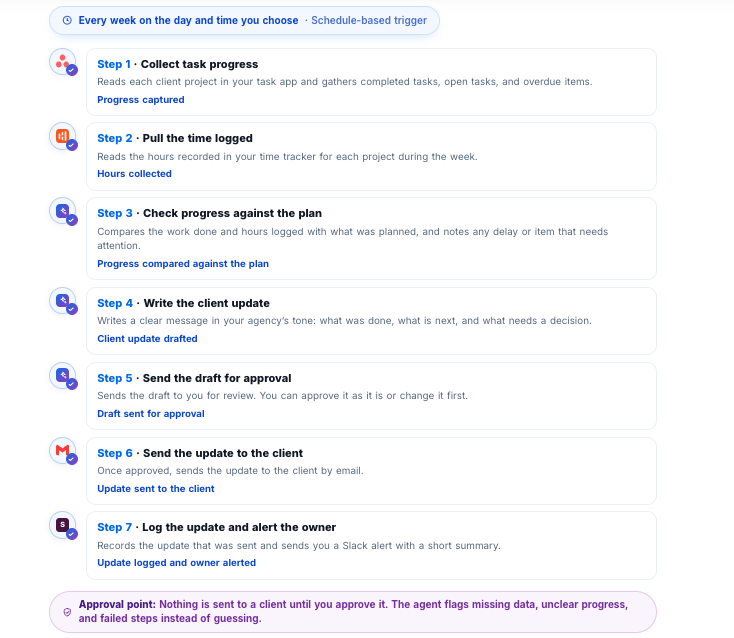
From weekly progress to a sent client update
See what starts the agent, which tools it uses at each step, and what it produces at the end, with approval where you decide it matters.
Not a blank page. A client update, ready to send.
This AI agent does not return a generic summary. It prepares the update, waits for your approval, and delivers it through the tools you already use.
From Friday afternoon reports to updates that write themselves
Here is how the same work runs today by hand, and how it runs with the Weekly Project Status Update AI Agent.
Your team stays in control
The agent works in the background, but your agency decides what it can do on its own and what needs a person first.
Similar AI Agents






FAQs
What does the Weekly Project Status Update AI agent do?
Each week, it gathers progress from your task app and the hours from your time tracker. It then writes a client update with what was done, what is next, and what needs a decision. After you approve it, the update is sent to the client.
Which tools does it work with?
It works with your task app, your time tracker, Gmail, and Slack. It reads progress and hours from the first two, sends the update through Gmail, and alerts you in Slack.
Will a client receive an update without my approval?
No. The AI agent sends you the draft first, and nothing goes to a client until you approve it. If you prefer, you can choose to let it send updates automatically.
Can I change the update before it is sent?
Yes. You can approve the draft as it is, or edit it first. The update is sent only after you are happy with it.
Will the update sound like my agency?
Yes. The AI agent writes in your agency’s tone. The first time you use it, it asks a few guiding questions about how you like to communicate with clients. It remembers your answers and uses them every week.
What happens if project information is missing or unclear?
The AI agent flags it instead of guessing. For example, if a task has no status or hours are missing, you are told before anything is written or sent, so no client receives an incorrect update.
Do I need technical skills to set it up?
No. You ask the AI agent to prepare your weekly updates, answer its guiding questions once, and choose the day and time. After that, it runs automatically every week.
Can I choose when the update is prepared?
Yes. You choose the day and time, such as Friday morning, so the draft is ready for your approval before the end of the week.
Can I see what the AI agent has done?
Yes. Every run and every action is logged. You can see the execution history, who ran it, and what each client received. You can also control which team members are allowed to run it.
Is my project and client information kept secure?
WorkLLM uses tenant isolation for every customer, so your data is kept separate from other customers.