
























AI for your entire support team's daily work

WorkLLM provides an AI workspace with organization-wide memory and support agents, so your entire support team can handle everyday work from answering tickets to resolving issues and spotting trends with AI, handling more tickets without adding headcount.

WorkLLM - Support Knowledge Hero

You’re In Good Company

Watson
Vidboard
Odiagen AI
Boxbox
Shelf Talker
Wisary
Pauv
Apex
Layer Five
Arka
FeelPixel
AI Collective
Alike-Audience
Support Problems

What slows support teams down

Answers are buried across docs and past tickets

Product docs, policies, and how a similar ticket got solved last time live in different places, so agents dig or guess instead of answering fast.

Hours lost to repetitive replies

The same questions, refunds, troubleshooting steps, and status updates get answered from scratch every day, even though the replies follow the same patterns.

Triaging tickets is a job nobody has time for

Tickets sit across your help desk, inbox, and chat, so tagging, routing, and updating records pulls time away from customers.

Inconsistent answers and slow escalations

Different agents answer the same question differently and tough tickets stall waiting on the one person who knows, so resolution quality and speed depend on who picks up the ticket.
How WorkLLM helps support teams

One workspace for everything your support team does with AI

Answers people can trust, with the source

Your docs, policies, and past resolutions live in one place, so agents get the right answer with a link to the source instead of digging or guessing.

First drafts in minutes, not hours

Use ready-made agents that turn a ticket into solid first-draft replies for common questions, troubleshooting, and updates, then edit and send.

Triage and updates, handled automatically

Connect your work apps so workflow agents tag, route, and update tickets across your help desk on their own, no manual sorting or copy-paste.

Consistent answers across every agent

Work in one shared space with thread sharing, co-prompting, comments, and shared outputs, so every agent answers from the same docs and the latest resolution.
Support Use Cases

What your support team actually uses WorkLLM for

Answers from your actual docs

Agents answer customer and agent questions from your real product docs and past resolutions, with a link to the source, so every reply is accurate instead of a confident guess.

Draft replies any agent can send

Anyone on the team runs an agent to turn a ticket into an on-brand reply grounded in how similar tickets were resolved, so quality doesn't depend on who picks up the ticket.

Triage and routing that runs itself

Workflow agents tag, prioritize, and route incoming tickets across your help desk automatically, so nothing sits unassigned and agents start the day on the right tickets.

Troubleshooting backed by past fixes

Agents walk through known issues using the steps that actually resolved them before, pulled from org memory, so agents fix faster instead of rediscovering the solution.

Escalation summaries done for you

Workflow agents summarize the ticket history and context when a case escalates, so the next person picks it up with full context instead of asking the customer to repeat themselves.

Trends surfaced from your tickets

Agents synthesize recurring issues and themes across your tickets into clear summaries, so the team fixes root causes instead of answering the same question all week.
Support Agents

Support agents, ready from day one

Every agent below is available from day one. No configuration needed. Click any agent to see what it does and try it.

WorkLLM - Customer Insights

Customer Insights Agent

By: WorkLLM

Give support leaders instant insight into recurring issues, sentiment, and customer feedback themes across all tickets.
ICon - Competitor Insights

Competitive Intelligence Agent

By: WorkLLM

Give your team instant answers on competitor positioning, differentiation, and battlecards, shared across Product, Sales, and Marketing.
Icon - Customer Context

Customer Context Agent

By: WorkLLM

Give reps a customer's full ticket history, plan details, and past resolutions, pulled straight from your helpdesk and CRM.
Icon - Support Knowledge

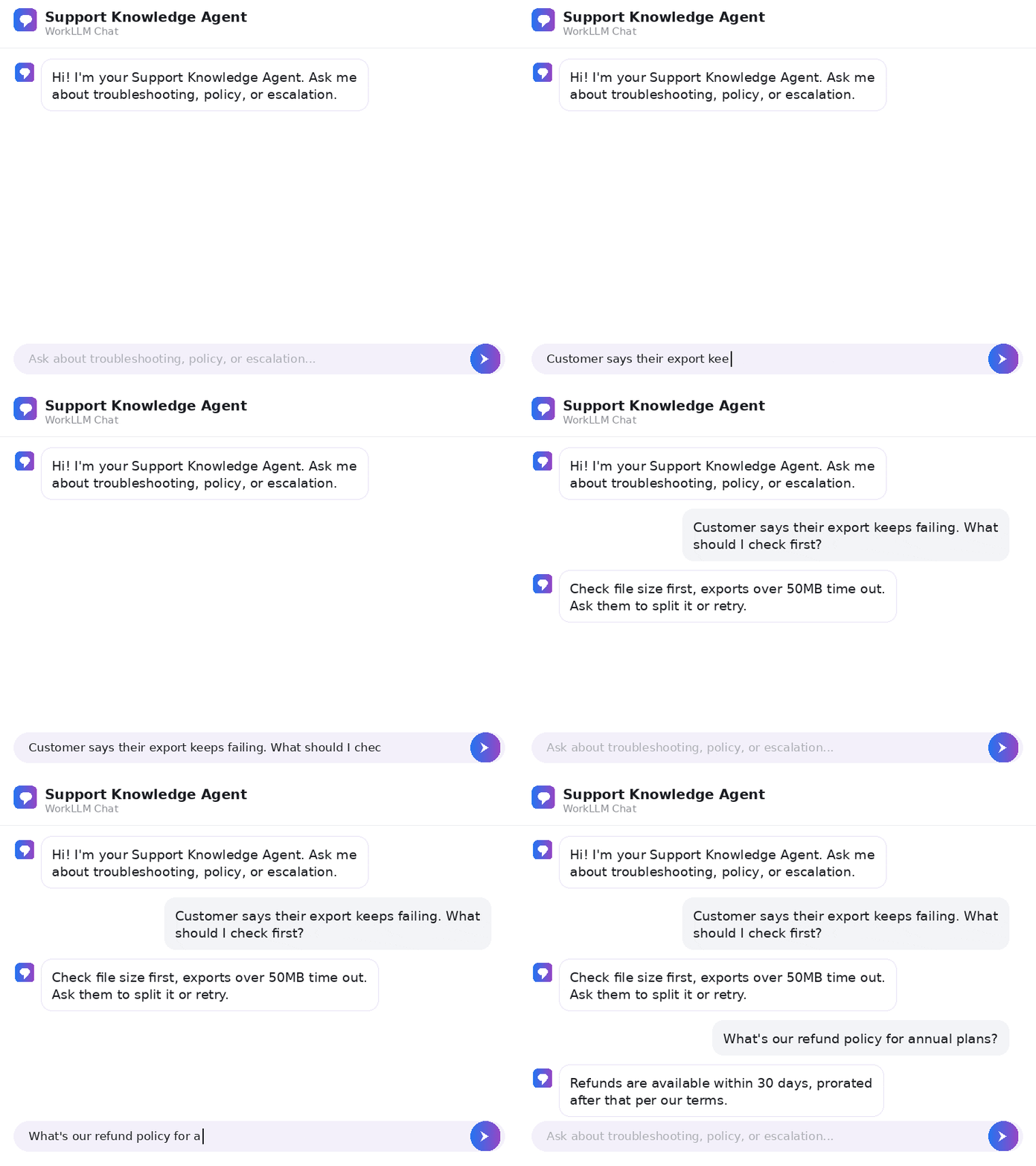
Support Knowledge Agent

By: WorkLLM

Give reps instant troubleshooting steps, policy answers, and product documentation, so every ticket gets resolved faster.
Icon - Account Intelligence

Account Intelligence Agent

By: WorkLLM

Give reps instant account history, deal context, and stakeholder details, pulled straight from your CRM.

FAQs

A shared AI workspace that combines organization-wide memory, model orchestration, AI agents, and team collaboration, so your entire support team can run their daily work with AI, from answering tickets to resolving issues, handling escalations, and spotting trends.

No. Task agents give you one-click workflows to draft, summarize, and research, so anyone on the team gets quality output from simple inputs.

Your product docs, policies, and past resolutions live in organization-wide memory, so every reply pulls from your actual source of truth with a link to it, instead of a generic AI guess, and no need to paste context each time.

Integrations plus workflow agents tag, route, and update tickets across your help desk automatically, so triage and record-keeping happen without manual sorting or copy-paste.

Yes. Integrations include Google Workspace, Slack, Jira, HubSpot, Notion, Salesforce, and more, so WorkLLM fits into your stack.

Yes. Model orchestration lets you use GPT, Claude, Gemini, Llama, Mistral, and over 200 models to get better answers for each use case.

Your whole team answers accurately and fast, not just the AI power users, because agents pull from your docs and past resolutions automatically. Triage and routine replies run on their own, so your team resolves more tickets without adding headcount and every customer gets a consistent answer.

Use thread sharing, co-prompting, comments, and shared outputs, so your agents work together and build on the same docs and latest resolutions.

WorkLLM is built with governance and a dedicated Security and Data Privacy foundation across all workspace layers.

Yes. Workflow agents can run automatically on app events or a schedule to handle recurring work like ticket triage, routing, status updates, and escalation summaries.

Knowledge agents surface answers from organization-wide memory, Task agents handle one-click drafting and summarizing, and Workflow agents automate multi-step processes.

Your support team can start using AI today

From answering tickets to resolving issues and spotting trends, WorkLLM gives your entire support team the tools to respond faster, answer consistently, and resolve more tickets without adding headcount.

Sign up to receive awesome content in your inbox.

We don’t spam! Read our privacy policy for more info.