
AI for your entire healthcare practice's administrative work
WorkLLM gives your practice an AI workspace with organization-wide memory and ready-to-run agents, so your front and back office can move faster on scheduling, billing, patient communication, and paperwork, so a lean administrative team keeps the practice running smoothly.
Teams at 60+ companies uses our platform























check out our reviews



Healthcare Practices Problems
What slows down administrative side of your business
What one person tells the AI stays with that person
The client context one person builds with the AI doesn't carry to anyone else, so every colleague starts the account over instead of picking up where the last one left off.
Scheduling, billing, and patient paperwork get built manually every time
Appointment confirmations, billing statements, insurance forms, and patient letters follow the same patterns every day, yet still get produced manually, so your front office spends hours on paperwork instead of patients and phones.
The multi-app work no one has time to automate
Every appointment, claim, and patient update means moving data manually across your scheduling system, billing software, and insurance portals, so work that could run on its own stays slow.
Your practice's best processes stay with one person
A smooth intake process, a clean way of following up on claims, or how your best front-desk person handles a tough call lives with whoever figured it out, so the practice keeps relearning what already works.
One AI workspace for your entire healthcare practice
WorkLLM’s AI agents handle your practice’s administrative work, from scheduling and billing to patient communication, so your whole front and back office moves faster without adding headcount.
How WorkLLM helps healthcare practices
One workspace for everything your administrative team does with AI
The AI remembers everything your team knows about a patient's account
Context builds up in shared org memory as your team works, so anyone on your front or back office gets AI that already knows the patient's billing and account history, without re-briefing.
First drafts in minutes, not hours
Use ready-made AI agents that turn patient and account details into appointment confirmations, billing statements, insurance forms, and patient letters in minutes, so your front office spends time on patients and phones, not paperwork.
Multi-step work that runs across your systems
Connect your work apps so workflow agents move appointments, claims, and patient updates across your scheduling system, billing software, and insurance portals on their own, so the work runs without your team being the glue between systems.
Your practice's best processes, reusable across the team
Work in one shared space with thread sharing, co-prompting, comments, and shared outputs, so a smooth intake process or a proven way of following up on claims becomes reusable across the practice instead of staying with one person.
Healthcare Practices Use Cases
What your administrative team actually uses WorkLLM for
Appointment confirmations and reminders in minutes
Staff turn a schedule into confirmation messages and reminders in your practice's format, so patients are reminded and no-shows drop, without anyone writing each one by hand.
Billing statements and insurance forms, drafted fast
Staff turn account and billing details into clear statements and insurance forms, so billing goes out faster and your team spends less time on paperwork.
Claims and insurance follow-up that runs across your systems
Workflow agents move claims, follow-ups, and status updates across your billing software and insurance portals on their own, so claims keep moving without your team chasing each one by hand.
Answers on a patient's account, from your actual records
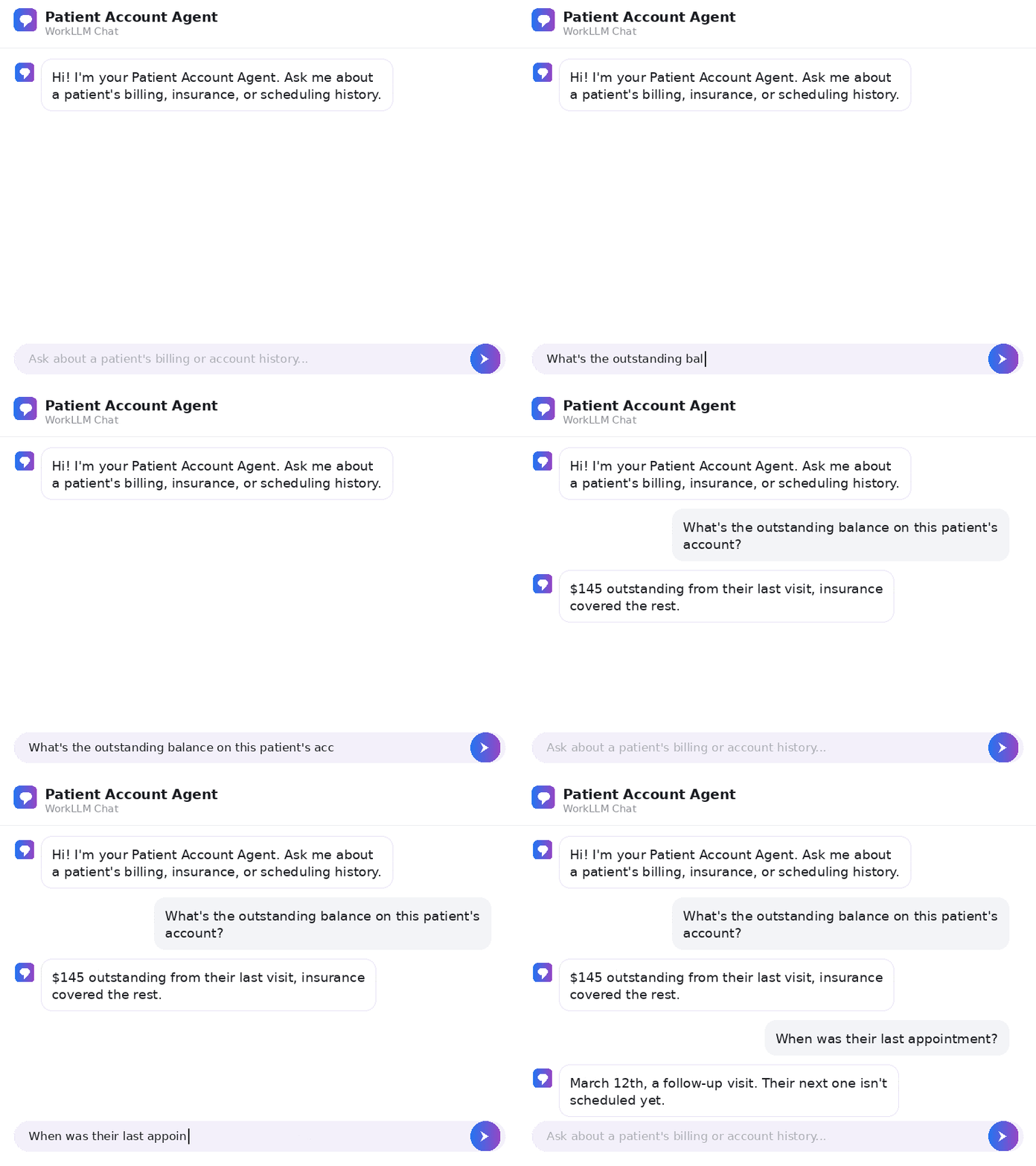
Ask about a patient's billing history, insurance details, or how the practice handles their account, and get answers from your real records, so any staff member gets the full picture instead of starting over.
Patient communication that stays on top of every account
Staff draft appointment updates, billing notices, and general practice communications from account details, so patients hear back promptly without staff writing every message from scratch.
Your practice's best processes, reused
A smooth intake flow, a proven way of following up on claims, or how your best front-desk person handles a tough call live in one workspace, so the practice builds on what already works instead of relearning it.
Healthcare Agents
Healthcare agents, ready from day one
Every agent below is available from day one. No configuration needed. Click any agent to see what it does and try it.

Patient Account Agent
By: WorkLLM
Give your front-office team instant access to patient billing, scheduling, and account history, kept securely isolated to your practice.
Front-Office Policy Agent
By: WorkLLM
Give your front-office team instant answers on scheduling, billing, and administrative procedures, so questions get resolved without pulling clinical staff away from patient care.
FAQs
What is WorkLLM for healthcare practices?
A shared AI workspace that combines organization-wide memory, model orchestration, AI agents, and team collaboration, so your administrative team can run the practice’s daily operations with AI, from scheduling and billing to insurance follow-up and patient communication.
What parts of our practice does WorkLLM handle?
WorkLLM is built for the administrative and operational side of your practice, scheduling, billing, insurance claims, patient communication, and front-office paperwork. It’s the AI workspace for running the business of your practice.
Do our front-desk and billing staff need AI or prompting expertise?
No. Ready-to-run AI agents give you one-click workflows to draft, summarize, and follow up, so anyone on your team gets quality output from simple inputs.
How does WorkLLM automate our billing and insurance work?
Workflow agents move claims, follow-ups, and status updates across your billing software and insurance portals on their own, so the multi-step work that eats your front office’s day runs without anyone chasing it by hand.
How does WorkLLM keep our team from starting over on each account?
Everything your team learns about a patient’s billing and account history builds up in shared org memory, so any staff member already has the full picture instead of starting from scratch.
Is patient and practice data kept private and secure?
Yes. Every practice gets its own dedicated, physically isolated tenant. Your practice’s data stays in a space that’s yours alone, never mixed with other practices’ data and never used to train AI models. For specific regulatory or data-handling requirements, your team can reach us directly to review your needs.
Does it work with our existing tools?
Yes. Integrations include Google Workspace, Slack, and more, so WorkLLM fits into your practice’s stack.
Can we choose the best AI model for each task?
Yes. Model orchestration lets you use GPT, Claude, Gemini, Llama, Mistral, and over 200 models to get better answers for each use case.
What outcomes should we expect?
Your whole administrative team works with AI, not just a few, because agents draw on your account records and practice processes automatically. Scheduling, billing, and claims work get faster, so your front office keeps up with more patients without adding headcount.
How do teams collaborate inside WorkLLM?
Use thread sharing, co-prompting, comments, and shared outputs, so your team works from the same account details and reuses processes that already work.
How is our data governed and protected?
Your practice’s data stays in a workspace you control, with physical tenant isolation and a dedicated Security and Data Privacy foundation across all workspace layers.
Can recurring administrative work be automated?
Yes. Workflow agents can run on a schedule or trigger to handle recurring work like appointment reminders, claims follow-up, and billing status updates.
What types of AI agents are available?
Knowledge agents surface answers from organization-wide memory, Task agents handle one-click drafting and summarizing, and Workflow agents automate multi-step processes.
Your healthcare practice can start using AI today
From scheduling and billing to insurance follow-up and patient communication, WorkLLM gives your administrative team the tools to work faster, keep patient data private, and run your practice without adding headcount.