


























WorkLLM works inside the apps you already have

Connect your work apps once. Whatever you do in them today, you can now do with a prompt, or let an AI agent handle it automatically.

WorkLLM - Work Apps

Teams at 80+ companies use our platform

Watson
2AV
Business.mn
Odiagen AI
Boxbox
Shelf Talker
Clear Trust
Guitar Kickstart
Apex
Layer Five
Arka
FeelPixel
Holzbau Binder
Landra
LeanAstro
N Essentials
Neures
Norzer
Nuovida
Pour
QL Consulting
Tuta
Zoetica
AI Integrations

Featured AI Integration

Everyone in the team gets its own set of AI Integrations, ready to use from day one.

Square Logo Icon

Square

By: WorkLLM

WorkLLM connects with Square and helps you process payments and manage orders. Ask in plain language, or add it to an AI agent to automate any workflow using Square.
Intercom Logo Icon

Intercom

By: WorkLLM

WorkLLM connects with Intercom and helps you reply to conversations and manage support cases. Ask in plain language, or add it to an AI agent to automate any workflow using Intercom.
Stack Exchange Icon Logo

Stack Exchange

By: WorkLLM

WorkLLM connects with Stack Exchange and helps you search and reference technical Q&A content. Ask in plain language, or add it to an AI agent to automate any workflow using Stack Exchange.
todoist icon logo

Todoist

By: WorkLLM

WorkLLM connects with Todoist and helps you create and manage your to-do list. Ask in plain language, or add it to an AI agent to automate any workflow using Todoist.
pushbullet logo icon

Pushbullet

By: WorkLLM

WorkLLM connects with Pushbullet and helps you send notifications across your devices. Ask in plain language, or add it to an AI agent to automate any workflow using Pushbullet.
Pinterest logo Icon

Pinterest

By: WorkLLM

WorkLLM connects with Pinterest and helps you publish pins and track engagement. Ask in plain language, or add it to an AI agent to automate any workflow using Pinterest.
Integration Features

Don't see your app on this list?

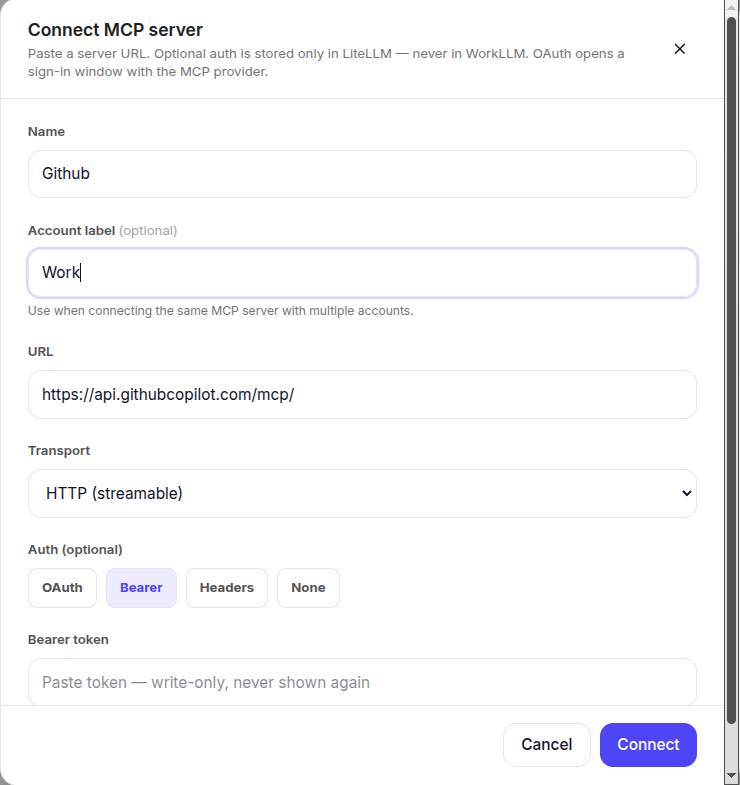
You can still connect it yourself using MCP, an open standard that lets you add apps we haven’t built a native integration for yet. No waiting. no developer needed. Once connected, any AI agent you build can use it too.

WorkLLM MCP Connect

FAQs

WorkLLM connects to the tools your company already uses, Google Workspace, Slack, Salesforce, HubSpot, Notion, GitHub, Dropbox, Microsoft Teams, and many more. Browse the full, current list of live integrations on this page.

It depends on the app. Every integration has its own page with a “What you can do” section listing exactly what WorkLLM can handle for that specific app, click into any integration above to see it.

Yes. WorkLLM only accesses what you explicitly approve through each app’s own authorization, and every action is logged. You can revoke access at any time.

If it supports MCP (Model Context Protocol), you can connect it directly, no need to wait for it to be added to our library. Otherwise, let us know what you need and we’ll help you get it connected.

No. Once an app is connected, any AI agent or chat you build can use it, you don’t reconnect it each time.

Yes. You can revoke access to any connected app at any time from your workspace settings, and nothing built on it keeps running without your permission.

Sign up to receive awesome content in your inbox.

We don’t spam! Read our privacy policy for more info.